
MagicSchool AI, Key Features and How to Use it

Background and mission
MagicSchool was created by former teachers and school leaders to reduce the behind‑the‑scenes workload that contributes to teacher burnout. The mission page notes that 44 % of K‑12 teachers in the U.S. feel burnt out and the developers have experienced firsthand how much time is spent on repetitive tasks like adapting texts, writing examples and emailing families. MagicSchool is designed to lighten teachers’ workload so they can focus on building relationships with students; the platform aims to save teachers up to 10 hours per week. It emphasizes simple, intuitive tools that are customizable to each classroom’s context—teachers can adjust outputs to align with specific reading levels, objectives or teaching philosophies. Unlike generic ed‑tech products, MagicSchool focuses on automating the “tedious, behind‑the‑scenes tasks” (e.g., generating content, writing IEPs, creating assessments) so teachers can concentrate on teaching.
“To put it simply, Magic School AI is like ChatGPT but has been heavily safeguarded to generate educational output only.” -FNH
Core platform features
Comprehensive tool suite
MagicSchool offers 80 plus AI tools for teachers and about 50 student tools. The tools are organized by purpose: lesson planning, content generation, assessment creation, differentiation, classroom management, communication and creative activities. In this blog, we will focus on features that help directly with lesson planning, content preparation , and assessing it.
Planning and content generation
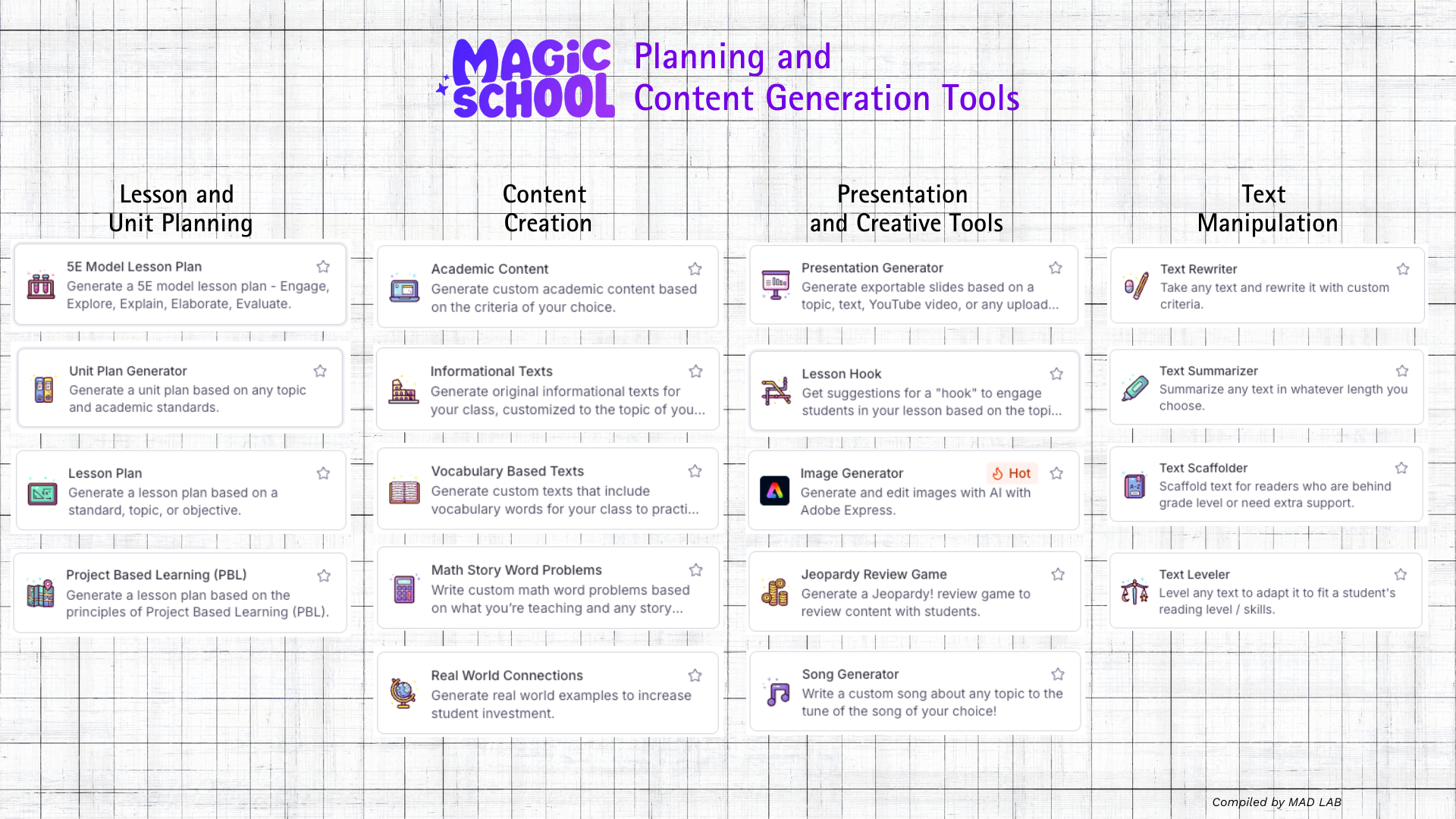
| Category | Key tools | Example benefits |
|---|---|---|
| Lesson and unit planning | Lesson Plan; 5E Model Lesson Plan; Unit Plan Generator; Project-based learning (PBL) plan | Saves time by drafting structured lessons or unit plans aligned to standards. Teachers can refine and personalize the plans instead of starting from scratch. |
| Content creation | Academic Content Generator; Informational Texts; Vocabulary-based texts; Math story word problems; Real world connections | Quickly produces reading passages, informational texts or math problems tailored to a topic or vocabulary list. Teachers can modify the output to match students’ interests or backgrounds. |
| Presentation and creative tools | Presentation Generator; Lesson Hook; Jeopardy review game; Image Generator; Song Generator | Allows teachers or students to create engaging review games, presentations or creative works without extensive design skills. Students can focus on the message rather than slide design. |
| Text manipulation | Text Rewriter; Text Summarizer; Text Scaffolder; Text Leveler; Text Translator | Enables teachers to rephrase, shorten or level texts to match students’ reading abilities or translate them into other languages, helping multilingual classrooms. |
Assessment and feedback
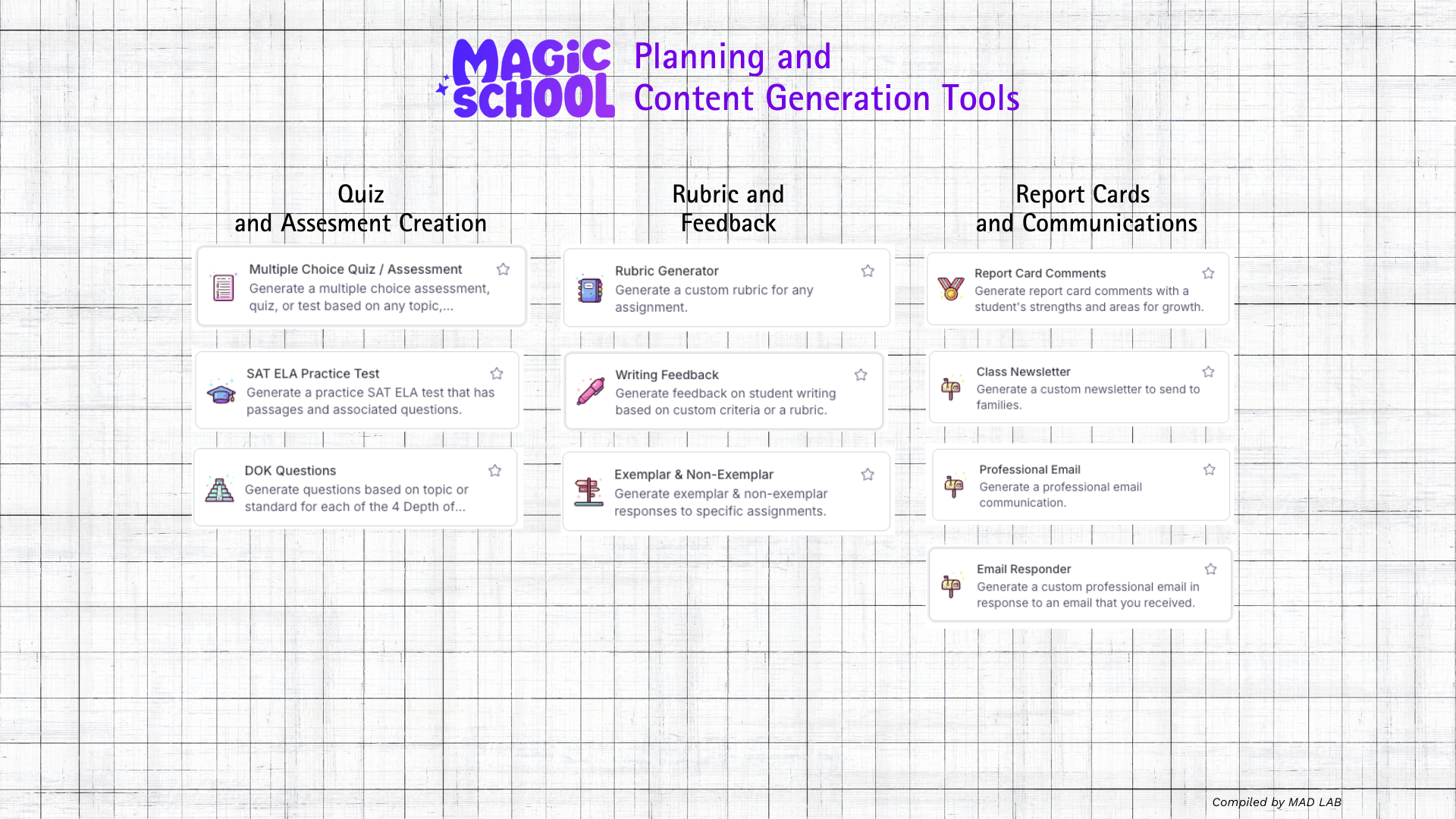
| Tool type | Examples | Benefits |
|---|---|---|
| Quiz and assessment creation | Multiple Choice Quiz/Assessment; DOK questions (Depth-of-Knowledge); SAT Practice tools | Quickly generates questions aligned to specific standards and levels of cognitive demand. Teachers can use them for formative assessments, exit tickets or homework. |
| Rubrics and feedback | Rubric Generator creates rubrics aligned to curriculum standards; Exemplar & Non‑Exemplar generator produces examples of high‑ and low‑quality responses; Writing Feedback tool provides areas of strength and growth on student writing | Simplifies grading by generating rubrics and examples. Case studies report that teachers at Green Dot Public Schools relied on the rubric generator because it automatically aligns criteria to standards, saving them time and improving consistency. |
| Report-card comments & email templates | Report Card Comments generator; Professional Email / Email Family / Email Responder; Class Newsletter | Automates routine communication with families and colleagues. The Chrome extension allows drafting professional emails directly within Gmail or Docs. |
How teachers can benefit from MagicSchool AI in the classroom
- Save significant planning time and reduce burnout – MagicSchool’s lesson‑planning, content‑generation and assessment tools reduce hours of manual work. The mission page states that the tools can save teachers up to 10 hours per week, freeing time to build relationships with students. The platform’s intuitive interface and exemplar features eliminate complex prompting, delivering results in seconds. Teachers can therefore shift from administrative tasks to interactive teaching.
- Differentiate instruction for diverse learners – Tools like Text Leveler, Text Scaffolder, Accommodation Suggestions, IEP/504 Plan Generators and Language Learning Tutor make it easier to tailor materials to students’ reading levels, language proficiencies and learning needs. Teachers can support struggling readers and English‑learners while maintaining high expectations.
- Provide instant feedback and formative assessment – The writing feedback tool gives students immediate comments on strengths and areas for growth. Rubric and exemplar generators simplify grading and help students understand expectations. Teachers can monitor real‑time participation through Student Room Insights dashboards, identify disengaged students and intervene early.
- Improve classroom engagement and creativity – Presentation, game and creative tools (e.g., Jeopardy Review Game, Lesson Hook, Song Generator) allow teachers to develop engaging activities. Students in a basketball camp used the presentation generator to make donor presentations quickly, showing how these tools foster creativity and leadership.
- Enhance communication and professional tasks – MagicSchool can draft emails, newsletters, thank‑you notes and report‑card comments. The platform also generates PD plans, teacher observation reports and letters of recommendation, simplifying administrative tasks.
- Access a safe, customizable AI environment – MagicSchool includes rigorous privacy protections and allows districts to customize moderation rules and tool settings. Teachers and administrators can tailor tools to district goals and standards using the Enterprise features and build context‑aware assistants from their own documents using RAG technology.
- Integrate AI seamlessly into existing workflows – The Chrome extension brings tools directly into everyday platforms (Gmail, Google Docs) and allows teachers to generate lesson plans, quizzes, rubrics and professional emails without leaving the page. This reduces context switching and encourages consistent use.
- Promote responsible AI use and AI literacy – MagicSchool emphasizes ethical use. The AI Literacy Day blog recommends focusing on students’ thinking process, tracking engagement, and empowering students as partners by starting with simple tasks and seeking feedback. Dublin’s custom AI disclosure chatbot shows how teachers can require students to explain how they used AI, reinforcing transparency.
Conclusion
MagicSchool AI functions as an AI operating system for schools, offering a comprehensive suite of tools that automate routine tasks, personalize instruction and encourage creative learning experiences. By blending lesson planning, content generation, assessment, differentiation, communication, chatbots, analytics and enterprise‑level customization, it positions teachers as the “magic” while AI serves as an assistant.
Using MagicSchool AI provides teachers with a more purposeful and structured AI experience compared to generic AI models like ChatGPT and Gemini. For routine teaching tasks, it significantly speeds up the process.
However, the strength of MagicSchool AI—its specialization in education—can also be seen as a limitation. Because the model is heavily fine-tuned for educational use, it falls short in handling general-purpose tasks, especially when compared to the latest versions of ChatGPT and Gemini. Ultimately, though, for teachers, this remains the best AI solution available today.
-this the end of the english version
MagicSchool AI, Beberapa Fitur Kunci dan Bagaimana Memanfaatkannya

Latar Belakang dan Misi
MagicSchool dibuat oleh mantan guru dan pemimpin sekolah untuk mengurangi beban kerja di balik layar yang sering menjadi penyebab kelelahan guru. Halaman misi mereka menyebutkan bahwa 44% guru K-12 di AS merasa mengalami burnout. Para pengembangnya pun pernah merasakan sendiri betapa banyak waktu tersita untuk tugas-tugas berulang seperti mengadaptasi teks, membuat contoh, atau mengirim email ke orang tua. MagicSchool dirancang untuk meringankan beban kerja guru sehingga mereka dapat lebih fokus membangun hubungan dengan siswa. Platform ini diklaim dapat menghemat waktu guru hingga 10 jam per minggu.
MagicSchool menekankan penggunaan alat yang sederhana, intuitif, dan dapat disesuaikan dengan konteks masing-masing kelas—guru dapat menyesuaikan hasil AI sesuai dengan tingkat membaca, tujuan pembelajaran, atau filosofi mengajar tertentu. Tidak seperti produk edtech generik, MagicSchool secara khusus dirancang untuk mengotomatisasi tugas-tugas “membosankan di belakang layar” (misalnya membuat konten, menulis IEP, menyusun asesmen), agar guru dapat fokus pada kegiatan mengajar.
“Singkatnya, Magic School AI seperti ChatGPT yang dibatasi secara ketat agar hanya menghasilkan konten edukatif.” –FNH
Fitur Inti Platform
Rangkaian Alat yang Komprehensif
MagicSchool menyediakan lebih dari 80 alat AI untuk guru dan sekitar 50 alat untuk siswa. Semua alat dikategorikan berdasarkan tujuan penggunaannya: perencanaan pelajaran, pembuatan konten, pembuatan asesmen, diferensiasi, manajemen kelas, komunikasi, dan aktivitas kreatif. Artikel ini akan fokus pada fitur-fitur yang secara langsung membantu dalam perencanaan pelajaran, persiapan materi, dan penilaian.
Perencanaan dan Pembuatan Konten
| Kategori | Alat Utama | Manfaat |
|---|---|---|
| Perencanaan Pelajaran dan Unit | Lesson Plan, 5E Model Lesson Plan, Unit Plan Generator, Project-based Learning (PBL) Plan | Menghemat waktu dengan menyusun rencana pelajaran/unit yang terstruktur dan selaras dengan standar. Guru tinggal menyunting dan menyesuaikan rencana, tidak perlu memulai dari awal. |
| Pembuatan Konten | Academic Content Generator, Informational Texts, Vocabulary-based Texts, Math Story Word Problems, Real World Connections | Menghasilkan bacaan, teks informatif, atau soal matematika yang relevan dengan topik atau kosakata tertentu. Guru dapat menyesuaikan output agar sesuai dengan minat atau latar belakang siswa. |
| Presentasi dan Aktivitas Kreatif | Presentation Generator, Lesson Hook, Jeopardy Review Game, Image Generator, Song Generator | Membantu guru dan siswa membuat presentasi menarik, permainan kuis, atau karya kreatif tanpa perlu keahlian desain yang kompleks. Fokus tetap pada isi, bukan tampilan. |
| Manipulasi Teks | Text Rewriter, Text Summarizer, Text Scaffolder, Text Leveler, Text Translator | Memudahkan guru untuk menyederhanakan, merangkum, atau menyesuaikan teks dengan tingkat kemampuan baca siswa, serta menerjemahkannya ke berbagai bahasa—sangat berguna di kelas multibahasa. |
Asesmen dan Umpan Balik
| Jenis Alat | Contoh | Manfaat |
|---|---|---|
| Pembuatan Kuis dan Asesmen | Multiple Choice Quiz/Assessment, DOK Questions, SAT Practice Tools | Menghasilkan soal-soal yang sesuai dengan standar dan tingkat kognitif tertentu. Dapat digunakan untuk asesmen formatif, exit ticket, atau pekerjaan rumah. |
| Rubrik dan Umpan Balik | Rubric Generator, Exemplar & Non-Exemplar Generator, Writing Feedback Tool | Mempermudah penilaian dengan rubrik otomatis yang selaras standar dan contoh karya. Studi kasus dari Green Dot Public Schools menunjukkan rubrik ini membantu konsistensi dan efisiensi penilaian. |
| Komentar Rapor & Template Email | Report Card Comments Generator, Professional Email, Email Family, Email Responder, Class Newsletter | Mengotomatiskan komunikasi rutin dengan orang tua atau kolega. Ekstensi Chrome memungkinkan penulisan email profesional langsung dari Gmail atau Google Docs. |
Bagaimana Guru Dapat Memanfaatkan MagicSchool AI di Kelas
- Menghemat waktu perencanaan & mengurangi burnout
Alat-alat untuk perencanaan, pembuatan konten, dan asesmen mengurangi jam kerja manual guru. Halaman misi menyebutkan bahwa guru bisa menghemat hingga 10 jam per minggu. Antarmuka yang intuitif dan hasil yang cepat membuat guru bisa langsung mengajar, bukan terus-terusan mengurus administrasi. - Menyesuaikan pembelajaran untuk kebutuhan siswa yang beragam
Alat seperti Text Leveler, Text Scaffolder, IEP/504 Plan Generator, dan Language Learning Tutor membantu menyesuaikan materi berdasarkan kemampuan membaca, latar belakang bahasa, dan kebutuhan khusus siswa. - Memberikan umpan balik cepat & asesmen formatif
Alat umpan balik tulisan memberi siswa komentar langsung mengenai kekuatan dan area yang perlu ditingkatkan. Generator rubrik dan contoh memudahkan penilaian dan memperjelas ekspektasi bagi siswa. Guru dapat memantau partisipasi lewat Student Room Insights dan melakukan intervensi dini jika perlu. - Meningkatkan keterlibatan & kreativitas siswa
Alat seperti Jeopardy Review Game, Lesson Hook, dan Song Generator memungkinkan guru membuat kegiatan menarik. Misalnya, siswa dalam kamp basket menggunakan Presentation Generator untuk membuat presentasi sponsor, menumbuhkan kreativitas dan kepemimpinan. - Meningkatkan komunikasi & tugas profesional
MagicSchool dapat membuatkan email, newsletter, ucapan terima kasih, dan komentar rapor. Platform ini juga menghasilkan rencana pengembangan profesional, laporan observasi guru, hingga surat rekomendasi. - Mengakses lingkungan AI yang aman & dapat disesuaikan
MagicSchool dilengkapi perlindungan privasi dan pengaturan khusus bagi distrik/sekolah. Fitur Enterprise memungkinkan kustomisasi berdasarkan dokumen internal menggunakan teknologi RAG (Retrieval-Augmented Generation). - Integrasi mulus ke dalam alur kerja guru
Ekstensi Chrome memungkinkan guru menggunakan alat MagicSchool langsung di Gmail atau Google Docs, mengurangi perpindahan platform dan membuat penggunaannya lebih konsisten. - Mendorong penggunaan AI yang etis & literasi AI
MagicSchool menekankan pentingnya penggunaan AI yang bertanggung jawab. Blog AI Literacy Day merekomendasikan agar siswa diajak berpikir kritis, mencatat proses penggunaan AI, dan memberi umpan balik. Contohnya, chatbot pengungkapan AI buatan Dublin mendorong siswa menjelaskan bagaimana mereka menggunakan AI dalam tugasnya.
Kesimpulan
MagicSchool AI berfungsi sebagai "sistem operasi AI untuk sekolah"—dengan alat lengkap yang mengotomatisasi tugas rutin, mempersonalisasi pembelajaran, dan mendorong pengalaman belajar yang kreatif. Dengan menyatukan perencanaan pelajaran, pembuatan konten, asesmen, diferensiasi, komunikasi, chatbot, analitik, dan kustomisasi tingkat institusi, platform ini menempatkan guru sebagai “sumber keajaiban” dan AI sebagai asisten mereka.
Penggunaan MagicSchool AI untuk guru memberikan pengalaman pemanfaatan AI yang lebih bertujuan dan terstruktur dibandingkan AI generik seperti ChatGPT dan Gemini. Untuk pekerjaan-pekerjaan rutin guru, ini akan membuatnya menjadi jauh lebih cepat.
Kelebihan MagicSchool AI yang sangat dikhsusukan untuk pendidikan juga menjadikan itu sebagai kekurangan. Dengan model AI yang sangat di finetuning sedemikian rupa membuatkan kalah dalam pekerjaan umum lain, terutama jika dibandingkan dengan ChatGPT dan Gemini di model terbarunya. Pada akhirnya, sebagai seorang guru, ini adalah solusi AI terbaik untuk anda saat ini.