
K-12 Academic Report System Using Google Apps Script
This blog is intended for my 2025 GSIS Conference Paralel's session.
- Database


This the database used by all the script here. If you want to change the column value or tab name, you must also need to edit it in the script otherwise the script won't call the correct data from the database.
Within the Sheet template above, there is a script to automatically insert student photo link from defined folder to the database. This photo link will be used to insert the photo to student's report. There is also function to automatically insert the student's email to the sheet based on the full name of the students.
Code.gs
/**
- updateProfilePhotoLinks()
- Searches for matching image files in a specified Drive folder
- based on each active student's full name from the "Complete Database" sheet.
- If a match is found, it updates (or adds) a hyperlink in Column B with the file URL.
*/
function updateProfilePhotoLinks() {
// Replace with your own folder ID (extracted from your Drive URL)
var folderId = 'YOUR_FOLDER_ID';
var folder = DriveApp.getFolderById(folderId);
var ss = SpreadsheetApp.getActiveSpreadsheet();
// Get the "Complete Database" sheet which contains student records.
var sheet = ss.getSheetByName("Complete Database");
if (!sheet) {
Logger.log("Sheet 'Complete Database' not found. Script stopped.");
return;
}
// Retrieve all data from the sheet.
var data = sheet.getDataRange().getValues();
// Initialize counters for reporting.
var totalStudents = 0;
var linkAdded = 0;
var linkReplaced = 0;
// Loop over each row starting from row 2 (row 1 is assumed to be headers).
for (var i = 1; i < data.length; i++) {
// Check if the student is active. Column F (index 5) should equal "active".
var currentStatus = data[i][5];
if (!currentStatus || currentStatus.toString().trim().toLowerCase() !== "active") {
Logger.log("Skipping row " + (i+1) + " because status is not Active.");
continue;
}
totalStudents++;
var fullName = data[i][2]; // Full Name is in Column C (0-indexed).
Logger.log("Processing student: " + fullName);
// Search the folder for files matching the student's full name.
var matchingFiles = [];
var files = folder.getFiles();
while (files.hasNext()) {
var file = files.next();
var fileName = file.getName();
// Remove the file extension (e.g., .jpg, .png) from the file name.
var nameWithoutExtension = fileName.replace(/\.[^/.]+$/, "");
// Compare the cleaned-up file name to the student's full name (ignoring case and extra spaces).
if (nameWithoutExtension.trim().toLowerCase() === fullName.toString().trim().toLowerCase()) {
matchingFiles.push(file);
}
}
// If matching files were found...
if (matchingFiles.length > 0) {
// Sort files by the "last updated" timestamp in descending order to choose the latest file.
matchingFiles.sort(function(a, b) {
return b.getLastUpdated() - a.getLastUpdated();
});
var latestFile = matchingFiles[0];
var latestFileId = latestFile.getId();
Logger.log("Found matching file for " + fullName + ": " + latestFile.getName() + " (ID: " + latestFileId + ")");
// Retrieve the cell in Column B (1-indexed) where the photo link is stored.
var cellRange = sheet.getRange(i + 1, 2);
var existingFormula = cellRange.getFormula();
var updateNeeded = false;
// Check if an existing hyperlink is present.
if (existingFormula && existingFormula.toString().trim() !== "") {
// Expected format: =HYPERLINK("URL","Photo")
var match = existingFormula.match(/HYPERLINK\("([^"]+)"/);
if (match && match[1]) {
var existingUrl = match[1];
// Extract the file ID from the URL using regex.
var idMatch = existingUrl.match(/\/d\/([^/]+)/);
if (idMatch && idMatch[1]) {
var existingFileId = idMatch[1];
Logger.log("Existing file ID for " + fullName + ": " + existingFileId);
// Update is needed if the existing file is not the latest.
if (existingFileId !== latestFileId) {
updateNeeded = true;
} else {
Logger.log("No update needed for " + fullName + " (existing file is the latest).");
}
} else {
// If we cannot extract a file ID, then update is needed.
updateNeeded = true;
}
} else {
// No valid hyperlink was found, so update is required.
updateNeeded = true;
}
} else {
// If no hyperlink exists, we must add one.
updateNeeded = true;
}
// If an update is needed, set the new hyperlink using the latest file's URL.
if (updateNeeded) {
var linkFormula = '=HYPERLINK("' + latestFile.getUrl() + '","Photo")';
cellRange.setValue(linkFormula);
if (existingFormula && existingFormula.toString().trim() !== "") {
linkReplaced++;
Logger.log("Replaced photo link for " + fullName);
} else {
linkAdded++;
Logger.log("Added photo link for " + fullName);
}
}
} else {
Logger.log("No matching file found for " + fullName);
}
}
// Log summary statistics after processing all rows.
Logger.log("Summary: Total active students processed: " + totalStudents +
", Link added: " + linkAdded +
", Link replaced: " + linkReplaced);
}
/**
- updateUserEmails()
- Updates user email addresses in the "Complete Database" sheet.
- For each row starting from row 2, if Column G (index 6) is empty,
- it searches the Admin Directory for a user matching the full name (Column C),
- and then writes the matched primary email into Column G.
*/
function updateUserEmails() {
// Get the active spreadsheet and "Complete Database" sheet.
var ss = SpreadsheetApp.getActiveSpreadsheet();
var sheet = ss.getSheetByName("Complete Database");
if (!sheet) {
Logger.log("Sheet 'Complete Database' not found. Exiting.");
return;
}
// Retrieve all data from the sheet.
var data = sheet.getDataRange().getValues();
// Loop through each row starting from row 2 (skip header row).
for (var i = 1; i < data.length; i++) {
var rowNumber = i + 1;
// Check if Column G (index 6) is already filled; if so, skip this row.
var emailCell = data[i][6];
if (emailCell && emailCell.toString().trim() !== "") {
Logger.log("Row " + rowNumber + ": Skipped because Column G is already filled with '" + emailCell + "'.");
continue;
}
// Retrieve the full name from Column C (index 2). If empty, skip the row.
var fullName = data[i][2];
if (!fullName || fullName.toString().trim() === "") {
Logger.log("Row " + rowNumber + ": Full name is empty. Skipping.");
continue;
}
var searchName = fullName.toString().trim();
// Build a query string to search for the user by name in the Admin Directory.
var queryStr = 'name:"' + searchName + '"';
Logger.log("Row " + rowNumber + ": Searching for user with query: " + queryStr);
var response;
try {
// Use the Admin Directory API to list users. Specify 'my_customer' to limit the search scope.
response = AdminDirectory.Users.list({
customer: 'my_customer',
query: queryStr
});
} catch (e) {
Logger.log("Row " + rowNumber + ": Error fetching user for '" + searchName + "': " + e);
continue;
}
// If users are returned, look for an exact match (ignoring case).
if (response.users && response.users.length > 0) {
var matchedEmail = "";
for (var j = 0; j < response.users.length; j++) {
var user = response.users[j];
if (user.name && user.name.fullName &&
user.name.fullName.trim().toLowerCase() === searchName.toLowerCase()) {
matchedEmail = user.primaryEmail;
break;
}
}
if (matchedEmail) {
// Write the matched email into Column G.
sheet.getRange(rowNumber, 7).setValue(matchedEmail);
Logger.log("Row " + rowNumber + ": Found matching email '" + matchedEmail + "'.");
} else {
Logger.log("Row " + rowNumber + ": No exact match found for '" + searchName + "' in admin directory.");
}
} else {
Logger.log("Row " + rowNumber + ": No user found f
Run the script directly from the App Script
- Report Slide Generator
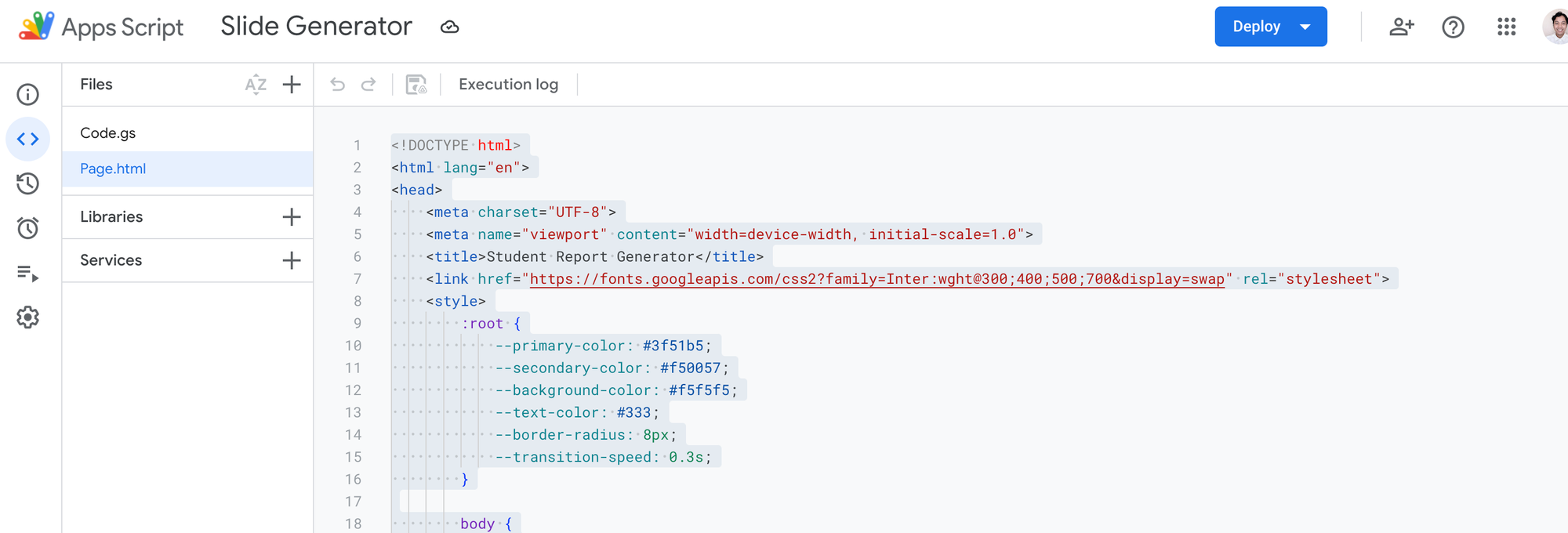
This is an App Script Web App, consist of Code.gs and Page.html. Here is the code:
Code.gs
/**
* ***********************
* Configuration Constants
* ***********************
*/
// Replace these with your own IDs and values.
const SHEET_ID = "YOUR_SHEET_ID"; // Google Sheet containing student data.
const PARENT_FOLDER_ID = "YOUR_PARENT_FOLDER_ID"; // Parent folder where reports will be stored.
const YEAR = "YOUR_YEAR"; // e.g. "2024-2025"
// Master Slide Templates – replace with your own template file IDs.
const MASTER_SLIDE_MONTHLY = "YOUR_MASTER_SLIDE_MONTHLY_ID";
const MASTER_SLIDE_SEM_TK = "YOUR_MASTER_SLIDE_SEM_TK_ID"; // Kindergarten Regular template.
const MASTER_SLIDE_SEM_TK_SN = "YOUR_MASTER_SLIDE_SEM_TK_SN_ID"; // Kindergarten SN template.
const MASTER_SLIDE_SEM_SD = "YOUR_MASTER_SLIDE_SEM_SD_ID"; // Elementary Lower Regular (grades 1-3).
const MASTER_SLIDE_SEM_SD_SN = "YOUR_MASTER_SLIDE_SEM_SD_SN_ID"; // Elementary Lower SN.
const MASTER_SLIDE_SEM_SD_UPPER = "YOUR_MASTER_SLIDE_SEM_SD_UPPER_ID"; // Upper Elementary Regular (grades 4-6).
const MASTER_SLIDE_SEM_SD_UPPER_SN = "YOUR_MASTER_SLIDE_SEM_SD_UPPER_SN_ID"; // Upper Elementary SN.
const MASTER_SLIDE_SEM_JH = "YOUR_MASTER_SLIDE_SEM_JH_ID"; // Junior High Regular.
const MASTER_SLIDE_SEM_JH_SN = "YOUR_MASTER_SLIDE_SEM_JH_SN_ID"; // Junior High SN.
// Global caches for the spreadsheet and parent folder to improve performance.
let _spreadsheet, _parentFolder;
/**
* Web App Entry Point – Serves the HTML page.
* This function is automatically called when users access your web app URL.
*/
function doGet() {
return HtmlService.createTemplateFromFile('Page')
.evaluate()
.setTitle('Student Report Generator')
.setXFrameOptionsMode(HtmlService.XFrameOptionsMode.ALLOWALL);
}
/**
* Retrieves all grades from the "Data Source" sheet.
* It reads values from column H (starting from row 2) and filters out empty cells.
*/
function getGrades() {
const sheet = getSpreadsheet().getSheetByName('Data Source');
if (!sheet) throw new Error('Sheet "Data Source" not found.');
const gradesRange = sheet.getRange("H2:H");
return gradesRange.getValues()
.filter(row => row[0])
.map(row => row[0]);
}
/**
* Retrieves all active students from the "Complete Database" sheet.
* It filters rows where the "Current status" column equals "active".
*/
function getAllActiveStudents() {
const sheet = getSpreadsheet().getSheetByName('Complete Database');
if (!sheet) throw new Error('Sheet "Complete Database" not found.');
const data = sheet.getDataRange().getValues();
const headers = data[0];
const fullnameIndex = headers.indexOf('Full Name');
const gradeIndex = headers.indexOf('Class Name');
const statusIndex = headers.indexOf('Current status');
if (fullnameIndex === -1 || gradeIndex === -1 || statusIndex === -1) {
console.error('One or more required columns (Full Name, Class Name, Current status) are not found.');
return [];
}
return data.slice(1)
.filter(row => (row[statusIndex] || '').toString().trim().toLowerCase() === 'active')
.map(row => ({ name: row[fullnameIndex], grade: row[gradeIndex] }));
}
/**
* Retrieves active students for a specific grade from the "Complete Database" sheet.
* Filters by the provided grade and an "active" status.
*/
function getStudentsForGrade(grade) {
const sheet = getSpreadsheet().getSheetByName('Complete Database');
if (!sheet) throw new Error('Sheet "Complete Database" not found.');
const data = sheet.getDataRange().getValues();
const headers = data[0];
const fullnameIndex = headers.indexOf('Full Name');
const gradeIndex = headers.indexOf('Class Name');
const statusIndex = headers.indexOf('Current status');
console.log('Headers:', headers);
console.log(`Selected grade from dropdown: "${grade}"`);
if (fullnameIndex === -1 || gradeIndex === -1 || statusIndex === -1) {
console.error('Missing columns (Full Name, Class Name, Current status).');
return [];
}
// Log a few rows for debugging purposes.
data.slice(1, 6).forEach((row, i) => {
console.log(`Row ${i+2} => Class: "${row[gradeIndex]}", Status: "${row[statusIndex]}", Name: "${row[fullnameIndex]}"`);
});
return data.slice(1)
.filter(row =>
row[gradeIndex].toString().trim().toLowerCase() === grade.trim().toLowerCase() &&
row[statusIndex].toString().trim().toLowerCase() === 'active'
)
.map(row => row[fullnameIndex]);
}
/**
* Initiates slide generation based on report parameters.
* Depending on the generation type ('all', 'grade', or 'specific'),
* it gathers the list of students and processes them.
*/
function startSlideGeneration(reportType, timePeriod, generationType, selectedGrade, selectedStudents) {
let studentsToGenerate = [];
switch (generationType) {
case 'all':
studentsToGenerate = getAllActiveStudents();
break;
case 'grade':
studentsToGenerate = getStudentsForGrade(selectedGrade)
.map(name => ({ name, grade: selectedGrade }));
break;
case 'specific':
studentsToGenerate = selectedStudents
.map(name => ({ name, grade: selectedGrade }));
break;
}
if (studentsToGenerate.length === 0) {
return {
status: "error",
message: `No students found for ${generationType === 'grade' ? 'grade ' + selectedGrade : 'the selected criteria'}. Please check your inputs.`,
log: {}
};
}
return processStudents(reportType, timePeriod, studentsToGenerate);
}
/**
* Continues slide generation from a specific index.
* Useful if a previous generation run was interrupted.
*/
function continueSlideGeneration(startIndex, reportType, timePeriod, studentsToGenerate) {
return processStudents(reportType, timePeriod, studentsToGenerate.slice(startIndex));
}
/**
* Processes the list of students and generates slides for each.
* Logs success or error for each student and stops on error.
*/
function processStudents(reportType, timePeriod, students) {
const generationLog = {};
let slidesGenerated = 0;
for (let i = 0; i < students.length; i++) {
const { name, grade } = students[i];
try {
console.log(`Processing student: ${name}, Grade: ${grade}`);
generateSlideForStudent(reportType, timePeriod, name, grade);
generationLog[name] = "Success";
slidesGenerated++;
} catch (e) {
console.error(`Error processing ${name}: ${e.message}`);
generationLog[name] = `Failed: ${e.message}`;
return {
status: "incomplete",
lastProcessedIndex: i,
slidesGenerated,
totalStudents: students.length,
log: generationLog,
error: e.message
};
}
}
return {
status: "complete",
slidesGenerated,
totalStudents: students.length,
log: generationLog
};
}
/**
* Generates a slide for a single student.
* It reads the student row from the database, extracts details like photo ID and SN status,
* then calls createSlide() to generate the report.
*/
function generateSlideForStudent(reportType, timePeriod, studentName, grade) {
const sheet = getSpreadsheet().getSheetByName('Complete Database');
if (!sheet) throw new Error('Sheet "Complete Database" not found.');
const data = sheet.getDataRange().getValues();
const headers = data[0];
const fullnameIndex = headers.indexOf('Full Name');
const nicknameIndex = headers.indexOf('Nick Name');
const photoIdIndex = headers.indexOf('Photo ID');
const snIndex = headers.indexOf('SN'); // Column L for SN status
if (fullnameIndex === -1 || snIndex === -1) {
throw new Error('Required column(s) not found. Please check your column headers.');
}
// Find the student row (skip header row).
const studentRow = data.slice(1).find(row => row[fullnameIndex] === studentName);
if (!studentRow) throw new Error("Student not found");
// Log the SN value for debugging.
const snValue = studentRow[snIndex];
console.log("SN value for " + studentName + ": " + snValue);
// Determine program type based on SN status.
const isSN = snValue === true ? "sn" : "regular";
// Calculate the row number (adjusting for header row).
const rowNumber = data.indexOf(studentRow) + 1;
const photoCell = sheet.getRange(rowNumber, photoIdIndex + 1);
const richValue = photoCell.getRichTextValue();
const photoUrl = richValue ? richValue.getLinkUrl() : null;
const photoId = photoUrl ? photoUrl.match(/\/d\/([^/]+)/)[1] : null;
createSlide(reportType, timePeriod, photoId, studentRow, grade, isSN);
}
/**
* Creates a slide for a student by copying a master template,
* performing text replacements, and optionally inserting a photo.
*/
function createSlide(reportType, timePeriod, photoId, rowData, className, programType) {
console.log(`Creating slide for ${rowData[2]} in class ${className}, Program: ${programType}`);
try {
// Determine destination folders.
const parentFolder = getParentFolder();
const yearFolder = getOrCreateFolder(parentFolder, YEAR);
const reportTypeFolder = getOrCreateFolder(yearFolder, reportType);
const timePeriodFolder = getOrCreateFolder(reportTypeFolder, timePeriod);
const gradeFolder = getOrCreateFolder(timePeriodFolder, className);
// Select the appropriate master template based on report type, class, and program type.
const template = selectTemplate(reportType, className, programType);
const slideName = `${reportType} - ${timePeriod} | ${className} | ${rowData[2]}`;
const slideCopy = template.makeCopy(slideName, gradeFolder);
// If a photo ID exists, insert the student's image.
if (photoId) {
insertImageFromDrive(slideCopy.getId(), photoId, rowData[2]);
}
// Perform text replacements on all shapes in the slide.
const replacements = getReplacements(reportType, timePeriod, rowData, className);
const presentation = SlidesApp.openById(slideCopy.getId());
presentation.getSlides().forEach(slide => {
slide.getShapes().forEach(shape => {
const textRange = shape.getText();
if (textRange) {
replacements.forEach(([searchString, replacementString]) => {
if (textRange.asString().indexOf(searchString) !== -1) {
textRange.replaceAllText(searchString, replacementString);
}
});
}
});
});
console.log(`Slide creation completed for ${rowData[2]}`);
} catch (error) {
console.error(`Error creating slide for ${rowData[2]}: ${error.message}`);
throw error;
}
}
/**
* Selects the appropriate master slide template based on report type, class, and program type.
* Throws an error if no matching template is found.
*/
function selectTemplate(reportType, className, programType) {
let template;
const isSemesterReport = (reportType === "Semester" || reportType === "Mid Semester");
if (reportType === "Monthly") {
template = DriveApp.getFileById(MASTER_SLIDE_MONTHLY);
} else if (isSemesterReport) {
if (className.includes("Kindergarten")) {
template = programType === "sn"
? DriveApp.getFileById(MASTER_SLIDE_SEM_TK_SN)
: DriveApp.getFileById(MASTER_SLIDE_SEM_TK);
} else if (/\b([1-6])\b/.test(className)) {
const gradeNumber = parseInt(className.match(/\b([1-6])\b/)[1], 10);
if (gradeNumber <= 3) {
template = programType === "sn"
? DriveApp.getFileById(MASTER_SLIDE_SEM_SD_SN)
: DriveApp.getFileById(MASTER_SLIDE_SEM_SD);
} else {
template = programType === "sn"
? DriveApp.getFileById(MASTER_SLIDE_SEM_SD_UPPER_SN)
: DriveApp.getFileById(MASTER_SLIDE_SEM_SD_UPPER);
}
} else if (["7", "8", "9"].some(num => className.includes(num))) {
template = programType === "sn"
? DriveApp.getFileById(MASTER_SLIDE_SEM_JH_SN)
: DriveApp.getFileById(MASTER_SLIDE_SEM_JH);
}
}
if (!template) {
throw new Error(`Template not found for report type: ${reportType}, class: ${className}, program: ${programType}`);
}
console.log(`Selected Template ID: ${template.getId()} for report type: ${reportType}, class: ${className}, program: ${programType}`);
return template;
}
/**
* Generates an array of text replacements for use in the slide.
* Replacements differ based on the report type.
*/
function getReplacements(reportType, timePeriod, rowData, className) {
const baseReplacements = [
["<<FullName>>", rowData[2]],
["<<NickName>>", rowData[3]],
["<<Grade>>", className],
["<<Class>>", className]
];
if (reportType === "Monthly") {
return [...baseReplacements, ["<<Month>>", timePeriod]];
} else {
return [...baseReplacements,
["<<Report of>>", `${reportType} ${timePeriod}`],
["<<BirthDay>>", rowData[17]],
["<<FatherName>>", rowData[18]],
["<<FatherNumber>>", rowData[20]],
["<<MotherName>>", rowData[19]],
["<<MotherNumber>>", rowData[22]],
["<<Address>>", rowData[23]]
];
}
}
/**
* Inserts an image into the slide by replacing a placeholder image.
* Retrieves the image from Drive using the provided photo ID.
*/
function insertImageFromDrive(fileID, photoId, studentName) {
try {
const presentation = SlidesApp.openById(fileID);
const slide = presentation.getSlides()[0];
const profileImage = slide.getImages()[1];
if (!profileImage) {
console.error(`Profile image placeholder not found for ${studentName}`);
return;
}
const driveImage = DriveApp.getFileById(photoId);
const newImage = profileImage.replace(driveImage);
newImage.setWidth(profileImage.getWidth())
.setHeight(profileImage.getHeight())
.setLeft(profileImage.getLeft())
.setTop(profileImage.getTop());
} catch (e) {
console.error(`Error inserting image for ${studentName}: ${e.message}`);
}
}
/**
* Retrieves a folder with the given name within a parent folder.
* If it does not exist, creates the folder.
*/
function getOrCreateFolder(parentFolder, folderName) {
const existingFolders = parentFolder.getFoldersByName(folderName);
return existingFolders.hasNext() ? existingFolders.next() : parentFolder.createFolder(folderName);
}
/**
* Retrieves and caches the Google Spreadsheet instance using SHEET_ID.
*/
function getSpreadsheet() {
if (!_spreadsheet) {
_spreadsheet = SpreadsheetApp.openById(SHEET_ID);
}
return _spreadsheet;
}
/**
* Retrieves and caches the parent folder instance using PARENT_FOLDER_ID.
*/
function getParentFolder() {
if (!_parentFolder) {
_parentFolder = DriveApp.getFolderById(PARENT_FOLDER_ID);
}
return _parentFolder;
}
Page.html
<!DOCTYPE html>
<html lang="en">
<head>
<meta charset="UTF-8">
<meta name="viewport" content="width=device-width, initial-scale=1.0">
<title>Student Report Generator</title>
<link href="https://fonts.googleapis.com/css2?family=Inter:wght@300;400;500;700&display=swap" rel="stylesheet">
<style>
:root {
--primary-color: #3f51b5;
--secondary-color: #f50057;
--background-color: #f5f5f5;
--text-color: #333;
--border-radius: 8px;
--transition-speed: 0.3s;
}
body {
font-family: 'Inter', sans-serif;
line-height: 1.6;
color: var(--text-color);
background-color: var(--background-color);
margin: 0;
padding: 20px;
}
.container {
max-width: 800px;
margin: 0 auto;
background-color: white;
padding: 20px;
border-radius: var(--border-radius);
box-shadow: 0 4px 6px rgba(0, 0, 0, 0.1);
}
h1, h2 {
color: var(--primary-color);
}
.section {
margin-bottom: 20px;
padding: 15px;
background-color: #fff;
border-radius: var(--border-radius);
box-shadow: 0 2px 4px rgba(0, 0, 0, 0.1);
transition: all var(--transition-speed) ease;
}
select, button {
width: 100%;
padding: 10px;
margin: 10px 0;
border: 1px solid var(--primary-color);
border-radius: var(--border-radius);
font-size: 16px;
transition: all var(--transition-speed) ease;
}
button {
background-color: var(--primary-color);
color: white;
cursor: pointer;
font-weight: bold;
}
button:hover {
background-color: var(--secondary-color);
}
button:disabled {
background-color: #ccc;
cursor: not-allowed;
}
.info {
background-color: #e3f2fd;
border-left: 4px solid var(--primary-color);
padding: 10px;
margin-bottom: 15px;
}
#studentList {
max-height: 200px;
overflow-y: auto;
border: 1px solid #ddd;
padding: 10px;
border-radius: var(--border-radius);
}
.checkbox-container {
display: flex;
align-items: center;
margin-bottom: 5px;
}
.checkbox-container input[type="checkbox"] {
margin-right: 10px;
}
#loadingIcon {
display: none;
text-align: center;
margin: 20px 0;
}
.loading {
display: inline-block;
width: 30px;
height: 30px;
border: 3px solid rgba(0, 0, 0, 0.3);
border-radius: 50%;
border-top-color: var(--primary-color);
animation: spin 1s ease-in-out infinite;
}
@keyframes spin {
to { transform: rotate(360deg); }
}
#debug {
background-color: #f8d7da;
color: #721c24;
padding: 10px;
margin-top: 20px;
border-radius: var(--border-radius);
height: 150px;
overflow-y: auto;
font-size: 14px;
}
.hidden {
display: none;
}
#detailedLogs {
background-color: #e9ecef;
padding: 10px;
margin-top: 20px;
border-radius: var(--border-radius);
max-height: 300px;
overflow-y: auto;
}
#logsContent {
white-space: pre-wrap;
word-wrap: break-word;
font-family: monospace;
font-size: 12px;
}
</style>
</head>
<body>
<div class="container">
<h1>Student Report Generator</h1>
<div class="info">
<p><strong>Note:</strong> This tool will generate reports for students based on your selection.</p>
</div>
<!-- Select Report Type -->
<div id="selectReportTypeSection" class="section">
<h2>Step 1: Select Report Type</h2>
<select id="reportTypeSelect" aria-label="Select report type">
<option value="">Select report type</option>
<option value="Monthly">Monthly</option>
<option value="Mid Semester">Mid Semester</option>
<option value="Semester">Semester</option>
</select>
</div>
<!-- Select Time Period -->
<div id="selectTimePeriodSection" class="section hidden">
<h2>Step 2: Select Time Period</h2>
<select id="timePeriodSelect" aria-label="Select time period">
<option value="">Select time period</option>
</select>
</div>
<!-- Select Generation Type -->
<div id="selectGenerationTypeSection" class="section">
<h2>Step 3: Select Generation Type</h2>
<select id="generationTypeSelect" aria-label="Select generation type">
<option value="">Select generation type</option>
<option value="all">All active students</option>
<option value="grade">Specific grade</option>
<option value="specific">Specific students</option>
</select>
</div>
<!-- Select Grade -->
<div id="selectGradeSection" class="section hidden">
<h2>Step 4: Select Grade</h2>
<select id="gradeSelect" aria-label="Select a grade">
<option value="">Select a grade</option>
</select>
</div>
<!-- Select Students -->
<div id="selectStudentsSection" class="section hidden">
<h2>Step 5: Select Students</h2>
<div id="studentList"></div>
</div>
<!-- Generate Slides Button -->
<div id="generateSlidesSection" class="section hidden">
<h2>Generate Slides</h2>
<button id="generateButton" onclick="generateSlides()" aria-label="Generate Slides">Generate Slides</button>
</div>
<!-- Continue Generation Button -->
<div id="continueGenerationSection" class="section hidden">
<h2>Continue Generation</h2>
<button id="continueButton" onclick="continueGeneration()" aria-label="Continue Generation">Continue Generation</button>
</div>
<div id="loadingIcon">
<div class="loading" aria-label="Loading"></div>
</div>
<!-- Results Section -->
<div id="results" class="section hidden"></div>
<div id="debug"></div>
<div id="detailedLogs" class="hidden">
<h2>Detailed Logs</h2>
<pre id="logsContent"></pre>
</div>
</div>
<script>
let studentsData = [];
let generationStatus = null;
function debugLog(message) {
const debugElement = document.getElementById('debug');
const timestamp = new Date().toISOString();
debugElement.innerHTML = `<p>${timestamp}: ${message}</p>${debugElement.innerHTML}`;
}
function showLoading() {
document.getElementById('loadingIcon').style.display = 'block';
}
function hideLoading() {
document.getElementById('loadingIcon').style.display = 'none';
}
function showSection(id) {
document.getElementById(id).classList.remove('hidden');
}
function hideSection(id) {
document.getElementById(id).classList.add('hidden');
}
document.addEventListener('DOMContentLoaded', function() {
debugLog('Document ready, fetching grades...');
google.script.run.withSuccessHandler(populateGrades).withFailureHandler(onFailure).getGrades();
});
function populateGrades(grades) {
debugLog('Populating grades: ' + JSON.stringify(grades));
const select = document.getElementById('gradeSelect');
grades.forEach(function(grade) {
const option = document.createElement('option');
option.value = grade;
option.textContent = grade;
select.appendChild(option);
});
}
document.getElementById('reportTypeSelect').addEventListener('change', function() {
const reportType = this.value;
const timePeriodSelect = document.getElementById('timePeriodSelect');
timePeriodSelect.innerHTML = '<option value="">Select time period</option>';
if (reportType === 'Monthly') {
const months = ['January', 'February', 'March', 'April', 'May', 'June', 'July', 'August', 'September', 'October', 'November', 'December'];
months.forEach(month => {
const option = document.createElement('option');
option.value = month;
option.textContent = month;
timePeriodSelect.appendChild(option);
});
} else {
['1', '2'].forEach(semester => {
const option = document.createElement('option');
option.value = semester;
option.textContent = `Semester ${semester}`;
timePeriodSelect.appendChild(option);
});
}
showSection('selectTimePeriodSection');
updateGenerateButton();
});
document.getElementById('timePeriodSelect').addEventListener('change', updateGenerateButton);
document.getElementById('generationTypeSelect').addEventListener('change', function() {
const generationType = this.value;
debugLog('Generation type selected: ' + generationType);
if (generationType === 'all') {
hideSection('selectGradeSection');
hideSection('selectStudentsSection');
showSection('generateSlidesSection');
} else if (generationType === 'grade') {
showSection('selectGradeSection');
hideSection('selectStudentsSection');
showSection('generateSlidesSection');
} else if (generationType === 'specific') {
showSection('selectGradeSection');
hideSection('selectStudentsSection');
hideSection('generateSlidesSection');
}
updateGenerateButton();
});
document.getElementById('gradeSelect').addEventListener('change', function() {
const grade = this.value;
const generationType = document.getElementById('generationTypeSelect').value;
debugLog('Grade selected: ' + grade);
if (grade && generationType === 'specific') {
debugLog('Fetching students for grade: ' + grade);
showLoading();
google.script.run.withSuccessHandler(displayStudents).withFailureHandler(onFailure).getStudentsForGrade(grade);
}
updateGenerateButton();
});
function displayStudents(students) {
debugLog('Displaying students: ' + JSON.stringify(students));
studentsData = students;
const studentList = document.getElementById('studentList');
studentList.innerHTML = students.map(student => `
<div class="checkbox-container">
<input type="checkbox" id="${student}" class="studentCheckbox" value="${student}">
<label for="${student}">${student}</label>
</div>
`).join('');
showSection('selectStudentsSection');
showSection('generateSlidesSection');
hideLoading();
}
function updateGenerateButton() {
const reportType = document.getElementById('reportTypeSelect').value;
const timePeriod = document.getElementById('timePeriodSelect').value;
const generationType = document.getElementById('generationTypeSelect').value;
const grade = document.getElementById('gradeSelect').value;
const generateButton = document.getElementById('generateButton');
if (reportType && timePeriod && generationType &&
(generationType !== 'grade' || grade) &&
(generationType !== 'specific' || document.querySelectorAll('.studentCheckbox:checked').length > 0)) {
generateButton.disabled = false;
} else {
generateButton.disabled = true;
}
}
function generateSlides() {
debugLog('Generating slides...');
showLoading();
const reportType = document.getElementById('reportTypeSelect').value;
const timePeriod = document.getElementById('timePeriodSelect').value;
const generationType = document.getElementById('generationTypeSelect').value;
const selectedGrade = document.getElementById('gradeSelect').value;
const selectedStudents = Array.from(document.querySelectorAll('.studentCheckbox:checked')).map(cb => cb.value);
google.script.run
.withSuccessHandler(handleGenerationResult)
.withFailureHandler(onFailure)
.withLogger(logger)
.startSlideGeneration(reportType, timePeriod, generationType, selectedGrade, selectedStudents);
}
function logger(log) {
const logsContent = document.getElementById('logsContent');
logsContent.textContent += log + '\n';
showSection('detailedLogs');
}
function handleGenerationResult(result) {
debugLog('Generation result: ' + JSON.stringify(result));
generationStatus = result;
hideLoading();
const resultsSection = document.getElementById('results');
document.getElementById('logsContent').textContent = ''; // Clear previous logs
if (result.status === 'error') {
resultsSection.innerHTML = `<p class="error">${result.message}</p>`;
logger(`Error: ${result.message}`);
} else if (result.status === 'incomplete') {
showSection('continueGenerationSection');
resultsSection.innerHTML = `
<p>Generation incomplete. ${result.slidesGenerated} out of ${result.totalStudents} slides generated.</p>
<p>Please click "Continue Generation" to resume.</p>
`;
} else {
resultsSection.innerHTML = `
<p>Generation complete. ${result.slidesGenerated} out of ${result.totalStudents} slides generated.</p>
<p>Check the logs for details.</p>
`;
}
if (result.log && Object.keys(result.log).length > 0) {
displayGenerationLog(result.log);
}
showSection('results');
}
function continueGeneration() {
if (!generationStatus || generationStatus.status !== 'incomplete') {
alert('No incomplete generation to continue.');
return;
}
debugLog('Continuing generation...');
showLoading();
const reportType = document.getElementById('reportTypeSelect').value;
const timePeriod = document.getElementById('timePeriodSelect').value;
google.script.run
.withSuccessHandler(handleGenerationResult)
.withFailureHandler(onFailure)
.withLogger(logger)
.continueSlideGeneration(generationStatus.lastProcessedIndex, reportType, timePeriod, studentsData);
}
function displayGenerationLog(log) {
const logHtml = `
<h3>Generation Log:</h3>
<ul>
${Object.entries(log).map(([student, status]) => `<li>${student}: ${status}</li>`).join('')}
</ul>
`;
document.getElementById('results').insertAdjacentHTML('beforeend', logHtml);
}
function onFailure(error) {
debugLog('Error occurred: ' + error.message);
alert('An error occurred: ' + error.message);
hideLoading();
}
// Add event listeners to checkboxes
document.addEventListener('change', function(e) {
if (e.target && e.target.classList.contains('studentCheckbox')) {
updateGenerateButton();
}
});
</script>
</body>
</html>
Deploy as a Web App.
- Report Assistant
Apps Script Web App. A little bit more complex than the previous version. Consist of 4 files, Code.gs, Page.hmtl, Style.html, Scripts.html.
Code.gs
// *************************
// Configuration Constants
// *************************
const SHEET_ID = "YOUR_SHEET_ID"; // Replace with your actual Spreadsheet ID
// Global variable to cache the Spreadsheet instance.
let _spreadsheet;
/**
* Web App Entry Point
* -------------------
* This function serves as the main entry point when the web app is accessed.
* It loads and returns the HTML template named "Page" with a set title and X-Frame options.
*/
function doGet() {
return HtmlService.createTemplateFromFile('Page')
.evaluate()
.setTitle('Student Comment Generator')
.setXFrameOptionsMode(HtmlService.XFrameOptionsMode.ALLOWALL);
}
/**
* Helper Function: include(filename)
* -----------------------------------
* This function allows you to include additional HTML files (e.g., Page, Styles, Scripts)
* within your main HTML file by returning their content.
*/
function include(filename) {
return HtmlService.createHtmlOutputFromFile(filename).getContent();
}
/**
* getSpreadsheet()
* ----------------
* Returns a cached instance of the main Spreadsheet.
* If it hasn't been loaded yet, it opens the Spreadsheet using the provided SHEET_ID.
*/
function getSpreadsheet() {
if (!_spreadsheet) {
_spreadsheet = SpreadsheetApp.openById(SHEET_ID);
}
return _spreadsheet;
}
/**
* getParentFolder(folderId)
* --------------------------
* Retrieves and returns the parent folder using its ID.
* This is useful when saving or retrieving files from Drive.
*/
function getParentFolder(folderId) {
return DriveApp.getFolderById(folderId);
}
/**
* getGrades()
* -----------
* Retrieves a list of Grades from the "Data Source" sheet.
* It reads values from column H (starting from row 2), filters out empty cells,
* and returns an array of grade values.
*/
function getGrades() {
const sheet = getSpreadsheet().getSheetByName('Data Source');
const gradesRange = sheet.getRange("H2:H");
return gradesRange.getValues()
.filter(row => row[0])
.map(row => row[0]);
}
/**
* getStudents(grade)
* ------------------
* Returns a list (object) of active students in the specified grade from the "Complete Database" sheet.
* It maps each student's full name to an object containing their nickname and gender.
*/
function getStudents(grade) {
const sheet = getSpreadsheet().getSheetByName('Complete Database');
const dataRange = sheet.getDataRange();
const [headers, ...data] = dataRange.getValues();
// Determine the indices for the required columns.
const fullnameIndex = headers.indexOf('Full Name');
const nicknameIndex = headers.indexOf('Nick Name');
const gradeIndex = headers.indexOf('Class Name');
const genderIndex = headers.indexOf('Gender');
const statusIndex = headers.indexOf('Current status');
// Normalize the grade value for comparison.
const normalizedGrade = grade.trim().toLowerCase();
// Create an object mapping each student's full name to their details if they are active.
const students = {};
data.forEach(row => {
const rowGrade = (row[gradeIndex] || '').trim().toLowerCase();
const rowStatus = (row[statusIndex] || '').trim().toLowerCase();
if (rowGrade === normalizedGrade && rowStatus === 'active') {
students[row[fullnameIndex]] = {
'Nick Name': row[nicknameIndex],
'Gender': row[genderIndex]
};
}
});
return students;
}
/**
* generateComments(...)
* ----------------------
* Generates comments for each student and saves them into a Google Sheet.
* For "Monthly" reports, the sheet name is "[reportType - timePeriod | grade | Comments]".
* For other report types (Mid/Semester), it includes the subject in the sheet name and is stored
* inside a "Subjects" subfolder.
*
* Parameters:
* - reportType: Type of report (e.g., Monthly, Mid Semester, Semester)
* - timePeriod: Time period (e.g., month or semester number)
* - grade: The student grade
* - subject: The subject for non-Monthly reports
* - openingTemplate: The opening text template for the comment
* - gradeTemplates: Templates based on the student level
* - studentData: An object containing student details (name, nickname, etc.)
* - folderId: The ID of the folder where the sheet should be saved
*/
function generateComments(reportType, timePeriod, grade, subject, openingTemplate, gradeTemplates, studentData, folderId) {
console.log(`Generating comments for ${grade}, ${reportType} - ${timePeriod}, subject=${subject}`);
try {
// Retrieve the parent folder using the provided folderId.
const parentFolder = getParentFolder(folderId);
// Determine the sheet name based on report type.
let sheetName;
if (reportType === 'Monthly') {
sheetName = `${reportType} - ${timePeriod} | ${grade} | Comments`;
} else {
sheetName = `${reportType} - ${timePeriod} | ${grade} | ${subject} | Comments`;
}
// Create or get the appropriate sheet.
const { spreadsheet, sheet } = createOrGetSheet(parentFolder, sheetName, reportType);
// Clear existing content from the sheet.
const dataRange = sheet.getDataRange();
if (dataRange.getNumRows() > 0 && dataRange.getNumColumns() > 0) {
dataRange.clear();
}
// Set header row values.
sheet.getRange(1, 1, 1, 2).setValues([["Full Name", "Comment"]]);
// Loop through each student in studentData to generate comments.
let rowIndex = 2;
for (const [studentName, data] of Object.entries(studentData)) {
const nickname = data.nickname || studentName;
const gender = data.gender || "";
const level = data.level;
// Generate an individual comment using the provided templates.
const comment = generateIndividualComment(openingTemplate, gradeTemplates[level], studentName, nickname, gender);
// Write the student's name and generated comment into the sheet.
sheet.getRange(rowIndex, 1, 1, 2).setValues([[studentName, comment]]);
rowIndex++;
}
// Autosize the columns for better readability.
sheet.autoResizeColumns(1, 2);
return {
status: "success",
message: "Comments generated and saved to sheet successfully",
sheetUrl: spreadsheet.getUrl(),
totalComments: Object.keys(studentData).length
};
} catch (error) {
console.error("Error generating comments:", error);
return {
status: "error",
message: "Error generating comments: " + error.message
};
}
}
/**
* normalizeName(name)
* -------------------
* Normalizes a name string by replacing non-breaking spaces with regular spaces,
* trimming extra whitespace, converting to lowercase, and replacing multiple spaces with a single space.
* This helps in matching names reliably.
*/
function normalizeName(name) {
return name.replace(/\u00A0/g, ' ') // Replace non-breaking spaces with regular spaces
.trim()
.toLowerCase()
.replace(/\s+/g, ' ');
}
/**
* insertCommentsIntoSlides(...)
* -----------------------------
* Inserts comments into Google Slides presentations by performing a global text replacement.
* - For "Monthly" reports, it replaces the placeholder "<<comment>>".
* - For non-Monthly reports, the placeholder is determined based on the subject.
*
* Parameters:
* - reportType, timePeriod, grade, subject: Define the report details.
* - folderId: The ID of the folder containing the Slides files.
*/
function insertCommentsIntoSlides(reportType, timePeriod, grade, subject, folderId) {
try {
const parentFolder = getParentFolder(folderId);
// Determine the sheet name for comments.
let sheetName;
if (reportType === 'Monthly') {
sheetName = `${reportType} - ${timePeriod} | ${grade} | Comments`;
} else {
sheetName = `${reportType} - ${timePeriod} | ${grade} | ${subject} | Comments`;
}
// For non-Monthly reports, the comments sheet is stored in the "Subjects" subfolder.
let targetFolder = parentFolder;
if (reportType !== 'Monthly') {
const subfolders = parentFolder.getFoldersByName('Subjects');
if (subfolders.hasNext()) {
targetFolder = subfolders.next();
}
}
// Open the comments sheet.
const files = targetFolder.getFilesByName(sheetName);
if (!files.hasNext()) {
throw new Error(`Comments sheet not found: ${sheetName}`);
}
const spreadsheet = SpreadsheetApp.open(files.next());
const sheet = spreadsheet.getActiveSheet();
// Build a mapping from student full name to their comment.
const data = sheet.getDataRange().getValues();
const [headers, ...rows] = data;
const nameIndex = headers.indexOf('Full Name');
const commentIndex = headers.indexOf('Comment');
let nameToComment = {};
rows.forEach(row => {
const name = row[nameIndex];
const comment = row[commentIndex];
if (name && comment) {
nameToComment[name] = comment;
}
});
// ------------------------------
// Create a normalized mapping to aid in matching.
let normalizedNameToComment = {};
for (let key in nameToComment) {
normalizedNameToComment[normalizeName(key)] = nameToComment[key];
}
// ------------------------------
// Determine the placeholder text based on report type and subject.
let placeholder = '<<comment>>';
if (reportType !== 'Monthly') {
switch (subject) {
case 'Bahasa Indonesia':
placeholder = '<<bahasa>>';
break;
case 'English':
placeholder = '<<english>>';
break;
case 'Math':
placeholder = '<<math>>';
break;
case 'Arts':
placeholder = '<<arts>>';
break;
case 'Music':
placeholder = '<<music>>';
break;
case 'Physical Education':
placeholder = '<<pe>>';
break;
case 'MakerSpace':
placeholder = '<<makerspace>>';
break;
case 'Work Habits':
placeholder = '<<work>>';
break;
case 'Cooking':
placeholder = '<<cooking>>';
break;
case 'Coding':
placeholder = '<<coding>>';
break;
case 'PBL':
placeholder = '<<pbl>>';
break;
case 'Japanese':
placeholder = '<<japanese>>';
break;
case 'Gardening & Farming':
placeholder = '<<gardening>>';
break;
case 'Sustainability':
placeholder = '<<sustainability>>';
break;
case 'Digital Citizenship':
placeholder = '<<digital>>';
break;
case 'RBP':
placeholder = '<<rbp>>';
break;
case 'Character Building':
placeholder = '<<character>>';
break;
case 'Social & Emotional Health':
placeholder = '<<emotional>>';
break;
case 'Arts & Craft':
placeholder = '<<craft>>';
break;
case 'Numeracy':
placeholder = '<<numeracy>>';
break;
case 'Literacy':
placeholder = '<<literacy>>';
break;
case 'Science':
placeholder = '<<science>>';
break;
case 'Scientific Experimental Enquiry':
placeholder = '<<scientific>>';
break;
case 'Sport':
placeholder = '<<sport>>';
break;
case 'Religion':
placeholder = '<<religion>>';
break;
case 'Research':
placeholder = '<<research>>';
break;
case 'TED':
placeholder = '<<ted>>';
break;
case 'Social Studies':
placeholder = '<<socialstudies>>';
break;
case 'Social Responsibility':
placeholder = '<<responsibility>>';
break;
default:
placeholder = '<<comment>>';
}
}
// Iterate through each Google Slides file in the parent folder.
let filesIterator = parentFolder.getFilesByType(MimeType.GOOGLE_SLIDES);
while (filesIterator.hasNext()) {
let file = filesIterator.next();
let fileName = file.getName();
// Extract the student's name from the file name by splitting on '|'
let parts = fileName.split('|');
let name = parts[parts.length - 1].trim();
// Attempt to retrieve the comment using the original or normalized name.
let comment = nameToComment[name] || normalizedNameToComment[normalizeName(name)];
if (comment) {
let presentation = SlidesApp.openById(file.getId());
// Perform a global text replacement of the placeholder with the student's comment.
presentation.replaceAllText(placeholder, comment);
console.log(`Inserted comment for student: ${name}`);
} else {
console.log(`No comment found for student: ${name}`);
}
}
return {
status: "success",
message: "Comments inserted into slides successfully"
};
} catch (error) {
console.error("Error inserting comments:", error);
return {
status: "error",
message: "Error inserting comments: " + error.message
};
}
}
/**
* createOrGetSheet(folder, sheetName, reportType)
* ------------------------------------------------
* Helper function to either create a new Spreadsheet (and sheet) or retrieve an existing one.
* For non-Monthly reports, the sheet is stored in a "Subjects" subfolder.
*/
function createOrGetSheet(folder, sheetName, reportType) {
let targetFolder = folder;
if (reportType !== 'Monthly') {
const subfolders = folder.getFoldersByName('Subjects');
targetFolder = subfolders.hasNext() ? subfolders.next() : folder.createFolder('Subjects');
}
const files = targetFolder.getFilesByName(sheetName);
if (files.hasNext()) {
const spreadsheet = SpreadsheetApp.open(files.next());
const sheet = spreadsheet.getActiveSheet();
return { spreadsheet, sheet };
} else {
const newSpreadsheet = SpreadsheetApp.create(sheetName);
DriveApp.getFileById(newSpreadsheet.getId()).moveTo(targetFolder);
return { spreadsheet: newSpreadsheet, sheet: newSpreadsheet.getActiveSheet() };
}
}
/**
* generateIndividualComment(...)
* --------------------------------
* Combines the opening template and a level-specific template into a final comment.
* It replaces the placeholder "#N" with the student's name (or nickname) and also adjusts gender-specific pronouns.
*
* Parameters:
* - openingTemplate: The initial comment text.
* - levelTemplate: The template based on the student's level.
* - fullName: The student's full name.
* - nickname: The student's nickname (if available).
* - gender: The student's gender used for pronoun replacements.
*/
function generateIndividualComment(openingTemplate, levelTemplate, fullName, nickname, gender) {
let name = nickname || fullName;
// Internal function to replace gender-specific pronouns based on the student's gender.
function replacePronouns(text, gender) {
if (gender.toLowerCase() === "female") {
return text
.replace(/\bHe\b/g, "She")
.replace(/\bhe\b/g, "she")
.replace(/\bHis\b/g, "Her")
.replace(/\bhis\b/g, "her")
.replace(/\bhim\b/g, "her")
.replace(/\bHim\b/g, "Her");
}
return text;
}
// Replace placeholders and pronouns in both templates.
let processedOpening = replacePronouns(openingTemplate, gender).replace(/#N/g, name);
let processedLevel = replacePronouns(levelTemplate, gender).replace(/#N/g, name);
// Combine the processed templates to form the final comment.
return `${processedOpening} ${processedLevel}`;
}
/**
* getSaveLocation(...)
* --------------------
* Returns a human-readable string indicating where the generated comments are saved.
* It constructs the folder path based on the parent folder's name and whether a "Subjects" subfolder is used.
*/
function getSaveLocation(reportType, timePeriod, grade, subject, folderId) {
try {
const parentFolder = getParentFolder(folderId);
let folderPath = `${parentFolder.getName()}/`;
if (reportType !== 'Monthly') {
const subfolders = parentFolder.getFoldersByName('Subjects');
if (subfolders.hasNext()) {
folderPath += "Subjects/";
} else {
folderPath += "Subjects (will be created)/";
}
}
return folderPath;
} catch (error) {
console.error("Error getting save location:", error);
throw error;
}
}
/**
* commentsSheetExists(...)
* -------------------------
* Checks if a comments sheet already exists in the designated folder (or in the "Subjects" subfolder
* for non-Monthly reports) by looking for a file with the expected sheet name.
*
* Returns an object indicating whether the sheet exists and, if so, its URL.
*/
function commentsSheetExists(reportType, timePeriod, grade, subject, folderId) {
try {
const parentFolder = getParentFolder(folderId);
let targetFolder = parentFolder;
if (reportType !== 'Monthly') {
const subfolders = parentFolder.getFoldersByName('Subjects');
if (subfolders.hasNext()) {
targetFolder = subfolders.next();
}
}
let sheetName;
if (reportType === 'Monthly') {
sheetName = `${reportType} - ${timePeriod} | ${grade} | Comments`;
} else {
sheetName = `${reportType} - ${timePeriod} | ${grade} | ${subject} | Comments`;
}
const files = targetFolder.getFilesByName(sheetName);
if (files.hasNext()) {
const file = files.next();
return {
exists: true,
sheetUrl: file.getUrl()
};
} else {
return {
exists: false
};
}
} catch (error) {
console.error("Error checking for comments sheet:", error);
throw error;
}
}
Page.html
<!DOCTYPE html>
<html lang="en">
<head>
<meta charset="UTF-8">
<title>Student Comment Generator</title>
<?!= include('Styles'); ?>
</head>
<body>
<div class="container">
<h1>Student Comment Generator</h1>
<div class="info">
<p><strong>Note:</strong> This tool will generate comments for students based on your input.</p>
</div>
<!-- Step 1: Select Report Type -->
<div id="selectReportTypeSection" class="section">
<h2>Step 1: Select Report Type</h2>
<select id="reportTypeSelect">
<option value="">Select report type</option>
<option value="Monthly">Monthly</option>
<option value="Mid Semester">Mid Semester</option>
<option value="Semester">Semester</option>
</select>
</div>
<!-- Step 2: Select Time Period -->
<div id="selectTimePeriodSection" class="section hidden">
<h2>Step 2: Select Time Period</h2>
<select id="timePeriodSelect">
<option value="">Select time period</option>
</select>
</div>
<!-- Step 2b: Select Subject (only if Mid/Semester) -->
<div id="subjectSelectionSection" class="section hidden">
<h2>Step 2b: Select Subject</h2>
<select id="subjectSelect">
<option value="">Select subject</option>
<option value="Arts">Arts</option>
<option value="Arts & Craft">Arts & Craft</option>
<option value="Bahasa Indonesia">Bahasa Indonesia</option>
<option value="Character Building">Character Building</option>
<option value="Coding">Coding</option>
<option value="Cooking">Cooking</option>
<option value="Digital Citizenship">Digital Citizenship</option>
<option value="English">English</option>
<option value="Gardening & Farming">Gardening & Farming</option>
<option value="Japanese">Japanese</option>
<option value="Literacy">Literacy</option>
<option value="MakerSpace">MakerSpace</option>
<option value="Math">Math</option>
<option value="Music">Music</option>
<option value="Numeracy">Numeracy</option>
<option value="PBL">PBL</option>
<option value="Physical Education">Physical Education</option>
<option value="RBP">RBP</option>
<option value="Religion">Religion</option>
<option value="Research">Research</option>
<option value="Science">Science</option>
<option value="Scientific Experimental Enquiry">Scientific Experimental Enquiry</option>
<option value="Social & Emotional Health">Social & Emotional Health</option>
<option value="Social Studies">Social Studies</option>
<option value="Social Responsibility">Social Responsibility</option>
<option value="Sport">Sport</option>
<option value="Sustainability">Sustainability</option>
<option value="TED">ted</option>
<option value="Work Habits">Work Habits</option>
</select>
</div>
<!-- Step 3: Select Grade -->
<div id="selectGradeSection" class="section">
<h2>Step 3: Select Grade Level</h2>
<select id="gradeSelect">
<option value="">Select a class</option>
</select>
</div>
<!-- Step 4: Enter Comment Templates -->
<div id="commentTemplatesSection" class="section hidden">
<h2>Step 4: Enter Comment Templates</h2>
<h3>Opening Comment Template:</h3>
<textarea id="openingTemplate" rows="4" placeholder="Use #N for the student name"></textarea>
<h3>Grade-specific Templates:</h3>
<h4>Beginner:</h4>
<textarea id="beginnerTemplate" rows="4" placeholder="Use #N for the student name"></textarea>
<h4>Developing:</h4>
<textarea id="developingTemplate" rows="4" placeholder="Use #N for the student name"></textarea>
<h4>Expanding:</h4>
<textarea id="expandingTemplate" rows="4" placeholder="Use #N for the student name"></textarea>
<h4>Bridging Over:</h4>
<textarea id="bridgingTemplate" rows="4" placeholder="Use #N for the student name"></textarea>
</div>
<!-- Step 5: Assign each student a level -->
<div id="studentListSection" class="section hidden">
<h2>Step 5: Select Student Levels</h2>
<div id="studentList"></div>
</div>
<!-- Step 6: Select Folder -->
<div id="saveLocationSection" class="section">
<h2>Step 6: Select Folder</h2>
<p>Generated comments will be saved to:</p>
<p id="saveLocationDisplay"><em>Location will be displayed here</em></p>
<p>Please input the Google Drive folder ID or URL where you want to save the files:</p>
<input type="text" id="folderInput" placeholder="Enter Folder ID or URL">
</div>
<!-- Generate Button -->
<div id="generateCommentsSection" class="section">
<button id="generateButton" disabled>Generate and Save Comments</button>
</div>
<!-- Loading Icon -->
<div id="loadingIcon">
<div class="loading"></div>
</div>
<!-- Results Section -->
<div id="results" class="hidden"></div>
</div>
<?!= include('Scripts'); ?>
</body>
</html>
Styles.html
<style>
:root {
--primary-color: #3f51b5;
--secondary-color: #f50057;
--background-color: #f5f5f5;
--text-color: #333;
--border-radius: 8px;
--transition-speed: 0.3s;
}
body {
font-family: 'Inter', sans-serif;
line-height: 1.6;
color: var(--text-color);
background-color: var(--background-color);
margin: 0;
padding: 20px;
}
.container {
max-width: 800px;
margin: 0 auto;
background-color: white;
padding: 20px;
border-radius: var(--border-radius);
box-shadow: 0 4px 6px rgba(0, 0, 0, 0.1);
}
h1, h2, h3, h4 {
color: var(--primary-color);
}
.section {
margin-bottom: 20px;
padding: 15px;
background-color: #fff;
border-radius: var(--border-radius);
box-shadow: 0 2px 4px rgba(0, 0, 0, 0.1);
transition: all var(--transition-speed) ease;
}
select, button, textarea, input[type="text"] {
width: 100%;
padding: 10px;
margin: 10px 0;
border: 1px solid var(--primary-color);
border-radius: var(--border-radius);
font-size: 16px;
transition: all var(--transition-speed) ease;
}
button {
background-color: var(--primary-color);
color: white;
cursor: pointer;
font-weight: bold;
}
button:hover {
background-color: var(--secondary-color);
}
button:disabled {
background-color: #ccc;
cursor: not-allowed;
}
.info {
background-color: #e3f2fd;
border-left: 4px solid var(--primary-color);
padding: 10px;
margin-bottom: 15px;
}
#studentList {
max-height: 300px;
overflow-y: auto;
border: 1px solid #ddd;
padding: 10px;
border-radius: var(--border-radius);
}
.student-info-row {
display: flex;
align-items: center;
padding: 10px 0;
border-bottom: 1px solid #ddd;
}
.student-info-row > div {
flex: 1;
padding: 0 10px;
}
.student-info-row select {
width: 100%;
padding: 8px;
border-radius: var(--border-radius);
border: 1px solid var(--primary-color);
font-size: 14px;
transition: all var(--transition-speed) ease;
}
#loadingIcon {
display: none;
text-align: center;
margin: 20px 0;
}
.loading {
display: inline-block;
width: 30px;
height: 30px;
border: 3px solid rgba(0, 0, 0, 0.3);
border-radius: 50%;
border-top-color: var(--primary-color);
animation: spin 1s ease-in-out infinite;
}
@keyframes spin {
to { transform: rotate(360deg); }
}
#results {
margin-top: 20px;
padding: 15px;
background-color: #e8f5e9;
border-radius: var(--border-radius);
}
.hidden {
display: none;
}
</style>
Scripts.html
<script>
const reportTypeSelect = document.getElementById('reportTypeSelect');
const timePeriodSelect = document.getElementById('timePeriodSelect');
const subjectSelect = document.getElementById('subjectSelect');
const gradeSelect = document.getElementById('gradeSelect');
const generateButton = document.getElementById('generateButton');
const studentList = document.getElementById('studentList');
const saveLocationDisplay = document.getElementById('saveLocationDisplay');
const resultsDiv = document.getElementById('results');
const folderInput = document.getElementById('folderInput');
let useExistingCommentsSheet = false;
// Extract folder ID from a full URL or a simple ID string
function extractFolderId(input) {
const regex = /[-\w]{25,}/;
const match = input.match(regex);
return match ? match[0] : null;
}
// Update time period dropdown based on report type
function updateTimePeriod() {
timePeriodSelect.innerHTML = '<option value="">Select time period</option>';
hideSection('subjectSelectionSection');
if (reportTypeSelect.value === 'Monthly') {
const months = ['January','February','March','April','May','June','July','August','September','October','November','December'];
months.forEach(month => {
const option = document.createElement('option');
option.value = month;
option.textContent = month;
timePeriodSelect.appendChild(option);
});
} else if (reportTypeSelect.value === 'Mid Semester' || reportTypeSelect.value === 'Semester') {
['1','2'].forEach(sem => {
const option = document.createElement('option');
option.value = sem;
option.textContent = `Semester ${sem}`;
timePeriodSelect.appendChild(option);
});
// Show subject selection if not Monthly
showSection('subjectSelectionSection');
}
showSection('selectTimePeriodSection');
updateSaveLocation();
updateGenerateButton();
}
// Update student list when a grade is selected
function updateStudentList() {
if (gradeSelect.value && !useExistingCommentsSheet) {
const folderIdInput = folderInput.value.trim();
if (!folderIdInput) {
studentList.innerHTML = '';
hideSection('studentListSection');
updateGenerateButton();
return;
}
const folderId = extractFolderId(folderIdInput);
if (!folderId) {
studentList.innerHTML = '';
hideSection('studentListSection');
updateGenerateButton();
return;
}
showLoading();
google.script.run
.withSuccessHandler(displayStudents)
.withFailureHandler(handleError)
.getStudents(gradeSelect.value);
} else {
studentList.innerHTML = '';
hideSection('studentListSection');
}
updateSaveLocation();
updateGenerateButton();
}
// Render students list
function displayStudents(students) {
let html = `
<div class="student-info-row">
<div><strong>Student Name</strong></div>
<div><strong>Nickname</strong></div>
<div><strong>Gender</strong></div>
<div><strong>Level</strong></div>
</div>
`;
for (const [name, data] of Object.entries(students)) {
html += `
<div class="student-info-row">
<div>${name}</div>
<div>${data['Nick Name'] || ''}</div>
<div>${data['Gender']}</div>
<div>
<select name="${name}_level" required>
<option value="">Select Level</option>
<option value="beginner">Beginner</option>
<option value="developing">Developing</option>
<option value="expanding">Expanding</option>
<option value="bridging">Bridging Over</option>
</select>
</div>
</div>
`;
}
studentList.innerHTML = html;
showSection('studentListSection');
hideLoading();
updateGenerateButton();
}
// Update displayed save location
function updateSaveLocation() {
if (reportTypeSelect.value && timePeriodSelect.value && gradeSelect.value) {
const folderIdInput = folderInput.value.trim();
if (!folderIdInput) {
saveLocationDisplay.innerHTML = "<em>Please enter a valid folder ID or URL to see save location</em>";
return;
}
const folderId = extractFolderId(folderIdInput);
if (!folderId) {
saveLocationDisplay.innerHTML = "<em>Invalid folder ID or URL</em>";
return;
}
const subject = (reportTypeSelect.value === 'Monthly') ? "" : subjectSelect.value;
google.script.run
.withSuccessHandler(displaySaveLocation)
.withFailureHandler(handleError)
.getSaveLocation(reportTypeSelect.value, timePeriodSelect.value, gradeSelect.value, subject, folderId);
} else {
saveLocationDisplay.innerHTML = "<em>Please select all options to see save location</em>";
}
}
function displaySaveLocation(location) {
saveLocationDisplay.textContent = location;
}
// Generate comments and save them to the sheet
function generateComments() {
if (useExistingCommentsSheet) {
return;
}
const folderIdInput = folderInput.value.trim();
if (!folderIdInput) {
alert('Please enter a folder ID or URL.');
return;
}
const folderId = extractFolderId(folderIdInput);
if (!folderId) {
alert('Invalid folder ID or URL.');
return;
}
const gradeTemplates = {
beginner: document.getElementById('beginnerTemplate').value,
developing: document.getElementById('developingTemplate').value,
expanding: document.getElementById('expandingTemplate').value,
bridging: document.getElementById('bridgingTemplate').value
};
const studentData = {};
const rows = studentList.querySelectorAll('.student-info-row');
rows.forEach((row, i) => {
if (i > 0) { // skip header
const name = row.children[0].textContent;
const nickname = row.children[1].textContent;
const gender = row.children[2].textContent;
const level = row.children[3].querySelector('select').value;
if (level) {
studentData[name] = { nickname, gender, level };
}
}
});
showLoading();
const subject = (reportTypeSelect.value === 'Monthly') ? "" : subjectSelect.value;
google.script.run
.withSuccessHandler(displayResults)
.withFailureHandler(handleError)
.generateComments(
reportTypeSelect.value,
timePeriodSelect.value,
gradeSelect.value,
subject,
document.getElementById('openingTemplate').value,
gradeTemplates,
studentData,
folderId
);
}
// Insert comments into slides using global replacement
function insertComments() {
const folderIdInput = folderInput.value.trim();
if (!folderIdInput) {
alert('Please enter a folder ID or URL.');
return;
}
const folderId = extractFolderId(folderIdInput);
if (!folderId) {
alert('Invalid folder ID or URL.');
return;
}
showLoading();
const subject = (reportTypeSelect.value === 'Monthly') ? "" : subjectSelect.value;
google.script.run
.withSuccessHandler(displayInsertResults)
.withFailureHandler(handleError)
.insertCommentsIntoSlides(
reportTypeSelect.value,
timePeriodSelect.value,
gradeSelect.value,
subject,
folderId
);
}
function displayResults(results) {
hideLoading();
let html = `<h3>Results:</h3>
<p>Status: ${results.status}</p>
<p>Message: ${results.message}</p>`;
if (results.status === 'success') {
if (results.sheetUrl) {
html += `<p><a href="${results.sheetUrl}" target="_blank">View Comments Sheet</a></p>`;
}
html += `<button id="insertCommentsButton">Insert Comments into Slides</button>`;
}
resultsDiv.innerHTML = html;
showSection('results');
if (results.status === 'success') {
document.getElementById('insertCommentsButton').addEventListener('click', insertComments);
}
}
function displayInsertResults(results) {
hideLoading();
let html = `<h3>Insertion Results:</h3>
<p>Status: ${results.status}</p>
<p>Message: ${results.message}</p>`;
resultsDiv.innerHTML += html;
}
function handleError(error) {
hideLoading();
alert('An error occurred: ' + error.message);
}
function showLoading() {
document.getElementById('loadingIcon').style.display = 'block';
}
function hideLoading() {
document.getElementById('loadingIcon').style.display = 'none';
}
function showSection(id) {
document.getElementById(id).classList.remove('hidden');
}
function hideSection(id) {
document.getElementById(id).classList.add('hidden');
}
function updateGenerateButton() {
const folderIdInput = folderInput.value.trim();
if (useExistingCommentsSheet) {
generateButton.disabled = true;
generateButton.style.display = 'none';
} else {
generateButton.style.display = 'block';
const needsSubject = (reportTypeSelect.value === 'Mid Semester' || reportTypeSelect.value === 'Semester');
const subjectOk = needsSubject ? subjectSelect.value : true;
const allTemplatesFilled = ['openingTemplate', 'beginnerTemplate', 'developingTemplate', 'expandingTemplate', 'bridgingTemplate']
.every(id => document.getElementById(id).value.trim() !== '');
const levelsSelected = Array.from(studentList.querySelectorAll('.student-info-row select'))
.every(select => select.value !== '');
generateButton.disabled = !(
reportTypeSelect.value &&
timePeriodSelect.value &&
gradeSelect.value &&
subjectOk &&
allTemplatesFilled &&
levelsSelected &&
folderIdInput
);
}
}
function checkForExistingCommentsSheet() {
if (reportTypeSelect.value && timePeriodSelect.value && gradeSelect.value) {
const folderIdInput = folderInput.value.trim();
if (!folderIdInput) {
updateGenerateButton();
return;
}
const folderId = extractFolderId(folderIdInput);
if (!folderId) {
updateGenerateButton();
return;
}
showLoading();
const subject = (reportTypeSelect.value === 'Monthly') ? "" : subjectSelect.value;
google.script.run
.withSuccessHandler(handleCommentsSheetCheck)
.withFailureHandler(handleError)
.commentsSheetExists(reportTypeSelect.value, timePeriodSelect.value, gradeSelect.value, subject, folderId);
} else {
hideSection('commentTemplatesSection');
hideSection('studentListSection');
updateGenerateButton();
}
}
function handleCommentsSheetCheck(result) {
hideLoading();
if (result.exists) {
const useExisting = confirm(
"A comments sheet already exists for this selection. " +
"Do you want to use the existing sheet instead of generating new comments?"
);
if (useExisting) {
useExistingCommentsSheet = true;
hideSection('commentTemplatesSection');
hideSection('studentListSection');
generateButton.style.display = 'none';
displayResults({
status: 'success',
message: 'Using existing comments sheet.',
sheetUrl: result.sheetUrl,
totalComments: null
});
} else {
useExistingCommentsSheet = false;
generateButton.style.display = 'block';
showSection('commentTemplatesSection');
updateStudentList();
}
} else {
useExistingCommentsSheet = false;
generateButton.style.display = 'block';
showSection('commentTemplatesSection');
updateStudentList();
}
updateSaveLocation();
updateGenerateButton();
}
document.addEventListener('DOMContentLoaded', function() {
google.script.run
.withSuccessHandler(function(grades) {
grades.forEach(function(g) {
const option = document.createElement('option');
option.value = g;
option.textContent = g;
gradeSelect.appendChild(option);
});
})
.withFailureHandler(handleError)
.getGrades();
reportTypeSelect.addEventListener('change', function() {
updateTimePeriod();
checkForExistingCommentsSheet();
});
timePeriodSelect.addEventListener('change', function() {
updateSaveLocation();
checkForExistingCommentsSheet();
});
subjectSelect.addEventListener('change', function() {
updateSaveLocation();
checkForExistingCommentsSheet();
});
gradeSelect.addEventListener('change', function() {
checkForExistingCommentsSheet();
});
generateButton.addEventListener('click', generateComments);
['openingTemplate','beginnerTemplate','developingTemplate','expandingTemplate','bridgingTemplate','folderInput']
.forEach(id => {
document.getElementById(id).addEventListener('input', function() {
updateGenerateButton();
updateSaveLocation();
checkForExistingCommentsSheet();
});
});
studentList.addEventListener('change', updateGenerateButton);
hideSection('commentTemplatesSection');
hideSection('studentListSection');
generateButton.style.display = 'block';
});
</script>
Deploy as a webapp.
- Report Audit
This is a tool to check if any miss pronoun/possesive and if other student nickname called in the student report. It consist of two files, Code.gs and Page.html
Code.gs
// Global variable to store log messages for debugging.
var SCRIPT_LOGS = [];
/**
* doGet()
* -------
* Web app entry point.
* Returns the HTML content of the "Page" file with a set title and X-Frame options.
*/
function doGet() {
return HtmlService.createHtmlOutputFromFile('Page')
.setTitle('Slide Auditor')
.setXFrameOptionsMode(HtmlService.XFrameOptionsMode.ALLOWALL);
}
/**
* getClassNames()
* ---------------
* Reads the "Data Source" sheet to extract class names from a specific range.
* Filters out empty cells and returns an array of class names.
*/
function getClassNames() {
logMessage("Getting class names");
// Open the spreadsheet using a placeholder Spreadsheet ID.
var ss = SpreadsheetApp.openById("YOUR_SPREADSHEET_ID");
var sheet = ss.getSheetByName("Data Source");
var range = sheet.getRange("H2:H30");
var values = range.getValues();
// Filter out empty rows and map them to class names.
var classNames = values.filter(row => row[0] !== "").map(row => row[0]);
logMessage("Class names: " + JSON.stringify(classNames));
return classNames;
}
/**
* main(folderUrl, className)
* --------------------------
* Main function to audit Google Slides presentations.
* It accepts a folder URL and a class name, extracts the folder ID,
* retrieves all Slides file IDs from the folder, and scans them for issues.
* Returns an object containing the audit results and the log messages.
*/
function main(folderUrl, className) {
SCRIPT_LOGS = []; // Clear logs at the start of each run.
logMessage("Starting main function with folderUrl: " + folderUrl + " and className: " + className);
// Extract folder ID from the provided URL.
var folderId = getFileIdFromUrl(folderUrl);
if (!folderId) {
logMessage("Invalid folder URL");
throw new Error("Invalid folder URL");
}
// Retrieve file IDs for all Google Slides in the folder.
var fileIds = getFileIdsInFolder(folderId);
if (fileIds.length === 0) {
logMessage("No Google Slides files found in the specified folder");
throw new Error("No Google Slides files found in the specified folder");
}
// Scan each presentation for text issues.
var result = scanSlidesTextForMultiplePresentations(fileIds, className);
return {
audit: result,
logs: SCRIPT_LOGS
};
}
/**
* getFileIdFromUrl(url)
* -----------------------
* Extracts a file or folder ID from a provided URL using a regular expression.
* Returns the extracted ID or null if not found.
*/
function getFileIdFromUrl(url) {
logMessage("Getting file ID from URL: " + url);
const regex = /(?:\/)([\w-]{25,})/;
const match = url.match(regex);
var result = match && match.length > 1 ? match[1] : null;
logMessage("Extracted file ID: " + result);
return result;
}
/**
* getFileIdsInFolder(folderId)
* ----------------------------
* Retrieves all Google Slides file IDs from the folder specified by folderId.
* Returns an array of file IDs.
*/
function getFileIdsInFolder(folderId) {
logMessage("Getting file IDs in folder: " + folderId);
var folder = DriveApp.getFolderById(folderId);
var fileIds = [];
var files = folder.getFilesByType(MimeType.GOOGLE_SLIDES);
while (files.hasNext()) {
var file = files.next();
fileIds.push(file.getId());
}
logMessage("Number of files found: " + fileIds.length);
return fileIds;
}
/**
* scanSlidesTextForMultiplePresentations(presentationIds, className)
* -------------------------------------------------------------------
* Scans the text content of each slide in multiple Google Slides presentations.
* For each presentation, it matches the title against student data for the given class,
* then examines the text for occurrences of other students' nicknames or incorrect gender pronouns.
* Returns an object containing audit results.
*/
function scanSlidesTextForMultiplePresentations(presentationIds, className) {
var audit = {};
var auditCount = 0;
// Retrieve people data (students) for the specified class.
var peopleData = getPeopleData(className);
// Define arrays of pronouns to check.
var malePronouns = ['he', 'him', 'his', 'himself'];
var femalePronouns = ['she', 'her', 'hers', 'herself'];
logMessage("Starting scan for class: " + className);
logMessage("Number of presentations to scan: " + presentationIds.length);
logMessage("Number of people in class: " + peopleData.length);
// Process each presentation.
for (var i = 0; i < presentationIds.length; i++) {
var currentSlideID = presentationIds[i];
try {
var presentation = SlidesApp.openById(currentSlideID);
var slides = presentation.getSlides();
var presentationTitle = presentation.getName();
logMessage("Scanning presentation: " + presentationTitle);
// Attempt to find the matching student based on the presentation title.
var currentStudent = peopleData.find(person => presentationTitle.toLowerCase().indexOf(person.Fullname.toLowerCase()) !== -1);
if (!currentStudent) {
logMessage("No matching student found for presentation: " + presentationTitle);
continue;
}
logMessage("Matched student: " + currentStudent.Fullname + ", Gender: " + currentStudent.Gender);
var studentIssues = [];
// Loop through slides, skipping the first slide.
for (var j = 0; j < slides.length; j++) {
var slideIndex = j + 1;
// Skip the first slide.
if (slideIndex === 1) {
logMessage("Skipping slide 1 for presentation: " + presentationTitle);
continue;
}
var slide = slides[j];
var shapes = slide.getShapes();
logMessage("Scanning slide " + slideIndex + " of presentation: " + presentationTitle);
// Examine each shape on the slide.
for (var k = 0; k < shapes.length; k++) {
var shape = shapes[k];
var text = shape.getText().asString().toLowerCase();
logMessage("Text content of shape in slide " + slideIndex + ": " + text);
// Check for occurrences of other students' nicknames.
peopleData.forEach(person => {
if (person.Fullname.toLowerCase() !== currentStudent.Fullname.toLowerCase()) {
var nickname = person.Nickname ? person.Nickname.toLowerCase() : '';
if (nickname) {
// Use regex to ensure whole word matching.
var nicknamePattern = new RegExp("\\b" + nickname + "\\b", "i");
if (nicknamePattern.test(text)) {
studentIssues.push(`Found '${person.Nickname}' in slide ${slideIndex}`);
logMessage(`Found other student's name: ${person.Nickname} in slide ${slideIndex}`);
}
}
}
});
// Check for incorrect gender pronouns.
var pronounsToCheck = currentStudent.Gender.toLowerCase() === "male" ? femalePronouns : malePronouns;
pronounsToCheck.forEach(pronoun => {
var pronounPattern = new RegExp("\\b" + pronoun + "\\b", "i");
if (pronounPattern.test(text)) {
studentIssues.push(`Found incorrect pronoun '${pronoun}' in slide ${slideIndex}`);
logMessage(`Found incorrect pronoun: ${pronoun} in slide ${slideIndex} for ${currentStudent.Fullname}`);
}
});
}
}
// Record issues if found.
if (studentIssues.length > 0) {
audit[auditCount++] = `Issues for ${currentStudent.Fullname}: ${studentIssues.join(', ')}`;
} else {
logMessage('No issues found for ' + currentStudent.Fullname);
}
} catch (error) {
logMessage(`Error processing presentation ${currentSlideID}: ${error.message}`);
audit[auditCount++] = `Error processing presentation for ${currentStudent ? currentStudent.Fullname : 'Unknown Student'}: ${presentationTitle || currentSlideID}`;
}
}
logMessage('Scan complete. Number of issues found: ' + auditCount);
return audit;
}
/**
* getPeopleData(className)
* -------------------------
Page.html
<!DOCTYPE html>
<html lang="en">
<head>
<meta charset="UTF-8">
<meta name="viewport" content="width=device-width, initial-scale=1.0">
<title>Report Auditor - Millennia</title>
<link href="https://fonts.googleapis.com/css2?family=Roboto:wght@300;400;500&display=swap" rel="stylesheet">
<script src="https://unpkg.com/react@17/umd/react.development.js"></script>
<script src="https://unpkg.com/react-dom@17/umd/react-dom.development.js"></script>
<script src="https://unpkg.com/babel-standalone@6/babel.min.js"></script>
<style>
:root {
--primary-color: #8B0000; /* Dark red from the logo */
--secondary-color: #FFFFFF; /* White */
--text-color: #333333;
--background-color: #F5F5F5;
}
body {
font-family: 'Roboto', sans-serif;
background-color: var(--background-color);
margin: 0;
padding: 0;
display: flex;
justify-content: center;
align-items: center;
min-height: 100vh;
color: var(--text-color);
}
.container {
background-color: var(--secondary-color);
border-radius: 8px;
box-shadow: 0 4px 6px rgba(0, 0, 0, 0.1);
padding: 2rem;
width: 100%;
max-width: 500px;
text-align: center;
}
h2 {
color: var(--primary-color);
margin-bottom: 1.5rem;
}
.form-group {
margin-bottom: 1.5rem;
text-align: left;
}
label {
display: block;
margin-bottom: 0.5rem;
color: var(--text-color);
}
input[type="text"], select {
width: 100%;
padding: 0.75rem;
border: 1px solid #ddd;
border-radius: 4px;
font-size: 1rem;
}
button {
background-color: var(--primary-color);
color: var(--secondary-color);
border: none;
padding: 0.75rem 1.5rem;
font-size: 1rem;
border-radius: 4px;
cursor: pointer;
width: 100%;
transition: background-color 0.3s;
}
button:hover {
background-color: #6B0000; /* Darker shade of primary color */
}
.hidden {
display: none;
}
.loading-icon {
border: 16px solid #f3f3f3;
border-top: 16px solid var(--primary-color);
border-radius: 50%;
width: 120px;
height: 120px;
animation: spin 2s linear infinite;
margin: 2rem auto;
}
@keyframes spin {
0% { transform: rotate(0deg); }
100% { transform: rotate(360deg); }
}
.result-summary {
font-weight: bold;
margin-bottom: 1rem;
color: var(--primary-color);
}
.result-details {
text-align: left;
margin-bottom: 1rem;
}
#debugLog {
margin-top: 20px;
text-align: left;
white-space: pre-wrap;
font-family: monospace;
font-size: 12px;
max-height: 300px;
overflow-y: auto;
background-color: #f0f0f0;
padding: 10px;
border-radius: 4px;
}
</style>
</head>
<body>
<div class="container">
<div id="page1">
<h2>Report Auditor</h2>
<div class="form-group">
<label for="folderUrl">Enter folder URL containing reports:</label>
<input type="text" id="folderUrl" placeholder="https://drive.google.com/drive/folders/...">
</div>
<div class="form-group">
<label for="classSelect">Choose class:</label>
<select id="classSelect"></select>
</div>
<button onclick="startAudit()">Audit</button>
</div>
<div id="page2" class="hidden">
<h2>Audit In Progress</h2>
<div class="loading-icon"></div>
<p>Please wait while the audit is being performed...</p>
</div>
<div id="page3" class="hidden">
<div id="auditResults"></div>
<button onclick="reaudit()">Re-Audit</button>
</div>
<div id="debugLog" class="hidden"></div>
</div>
<script type="text/babel">
const AuditResults = ({ results }) => {
const issueCount = Object.keys(results).length;
return (
<div>
<h2>Audit Results</h2>
<div className="result-summary">
Audit Complete! Found {issueCount} issue(s).
</div>
<div className="result-details">
<ul>
{Object.values(results).map((issue, index) => (
<li key={index}>
{issue}
</li>
))}
</ul>
</div>
</div>
);
};
// Populate class names on page load
google.script.run.withSuccessHandler(populateClassNames).getClassNames();
function populateClassNames(classNames) {
const select = document.getElementById('classSelect');
classNames.forEach(className => {
const option = document.createElement('option');
option.value = className;
option.textContent = className;
select.appendChild(option);
});
}
function startAudit() {
const folderUrl = document.getElementById('folderUrl').value;
const className = document.getElementById('classSelect').value;
if (!folderUrl || !className) {
alert('Please enter a folder URL and select a class.');
return;
}
// Switch to page 2
document.getElementById('page1').classList.add('hidden');
document.getElementById('page2').classList.remove('hidden');
// Clear previous debug logs
document.getElementById('debugLog').textContent = '';
document.getElementById('debugLog').classList.remove('hidden');
// Start the audit
google.script.run
.withSuccessHandler(showResults)
.withFailureHandler(handleError)
.main(folderUrl, className);
}
function showResults(result) {
// Switch to page 3
document.getElementById('page2').classList.add('hidden');
document.getElementById('page3').classList.remove('hidden');
// Render React component
ReactDOM.render(
<AuditResults results={result.audit} />,
document.getElementById('auditResults')
);
// Display logs
const debugLog = document.getElementById('debugLog');
debugLog.textContent = result.logs.join('\n');
debugLog.classList.remove('hidden');
}
function handleError(error) {
alert('An error occurred: ' + error.message);
// Go back to page 1
document.getElementById('page2').classList.add('hidden');
document.getElementById('page1').classList.remove('hidden');
}
function reaudit() {
// Go back to page 1
document.getElementById('page3').classList.add('hidden');
document.getElementById('page1').classList.remove('hidden');
}
</script>
</body>
</html>
Deploy as a web app.
- Progress Tracker
Code.gs
// *********************************
// Slack / Messaging API Configuration
// *********************************
// Replace the URL below with your own Slack webhook URL or another messaging API endpoint.
// Do not use real API keys in shared examples.
var SLACK_WEBHOOK_URL = "YOUR_SLACK_WEBHOOK_URL";
/**
- onEdit(e)
- Triggered automatically when a cell is edited in the spreadsheet.
- Processes edits only on sheets that match required patterns (e.g., monthly, semester, IEP, PC, or JH/SD).
- Then calls functions to update statuses, check deadlines, and notify via Slack.
*/
function onEdit(e) {
Logger.log("onEdit triggered");
var sheet = e.source.getActiveSheet();
var sheetName = sheet.getName();
var sheetNameLower = sheetName.toLowerCase();
// Pattern to match sheets starting with "JH " or "SD " followed by text.
var jhSdPattern = /^(jh|sd)\s+.+/i;
// Only process sheets that are monthly, semester, IEP, PC, or match the JH/SD pattern.
if (!sheetNameLower.includes("monthly") &&
!sheetNameLower.includes("semester") &&
!sheetNameLower.includes("iep") &&
!sheetNameLower.includes("pc") &&
!jhSdPattern.test(sheetNameLower)) {
Logger.log("Sheet name does not match required patterns: " + sheetName);
return;
}
Logger.log("Processing sheet: " + sheetName);
var range = e.range;
var column = range.getColumn();
var row = range.getRow();
var value = range.getValue();
// Adjust row and column range checks based on sheet type.
if (sheetNameLower.includes("iep")) {
// For IEP sheets, process only edits in rows 3-27 and columns 5-9 (E to I).
if (row < 3 || row > 27 || column < 5 || column > 9) {
Logger.log("Edit outside of valid range for IEP sheet, ignoring.");
return;
}
} else {
// For other sheets (monthly, semester, JH*, SD*, PC), process only rows 3-26.
if (row < 3 || row > 26) {
Logger.log("Edit outside of rows 3-26, ignoring.");
return;
}
}
// Process the edit (update statuses, etc.).
handleEdit(sheet, column, row, value, e.source.getSheets().indexOf(sheet));
// Skip deadline checking for IEP sheets.
if (!sheetNameLower.includes("iep")) {
checkDeadline(sheet, row, column);
}
// Attempt to notify Slack about the edit.
try {
Logger.log("Attempting to notify Slack");
notifySlack(sheet, column, row, value, e.source.getSheets().indexOf(sheet), sheetName);
Logger.log("Slack notification completed");
} catch (error) {
Logger.log("Error during Slack notification: " + error.toString());
}
}
/**
- handleEdit(sheet, column, row, value, sheetIndex)
- Processes edits by updating various status columns based on conditions.
- Contains logic for updating "Draft 1", "Review 1", "Draft 2", "Review 2", and "Final Docs".
*/
function handleEdit(sheet, column, row, value, sheetIndex) {
Logger.log("handleEdit called - Sheet Index: " + sheetIndex + ", Column: " + column + ", Row: " + row + ", Value: " + value);
var sheetName = sheet.getName().toLowerCase();
if (sheetName.includes("iep")) {
// For IEP sheets, no specific handleEdit logic is applied.
Logger.log("No specific handleEdit logic for IEP sheets.");
} else {
// When Draft 1 is marked as "Submitted", update Review 1 to "Not Started".
if (column === 5 && value === "Submitted") {
Logger.log("Condition met: Draft 1 Submitted");
sheet.getRange(row, 6).setValue("Not Started");
Logger.log("Updated Review 1 to Not Started");
}
// If Review 1 (column 6) is edited, update subsequent columns based on status.
if (column === 6) {
Logger.log("Editing Review 1 status");
if (value === "Done") {
Logger.log("Review 1 is Done, updating subsequent columns");
sheet.getRange(row, 7).setValue("No Need"); // Draft 2
sheet.getRange(row, 8).setValue("No Need"); // Review 2
sheet.getRange(row, 9).setValue("Done"); // Final Docs
Logger.log("Updated Draft 2 and Review 2 to No Need, Final Docs to Done");
} else if (value === "Returned") {
Logger.log("Review 1 is Returned, setting Draft 2 to Ongoing");
sheet.getRange(row, 7).setValue("Ongoing"); // Draft 2
Logger.log("Set Draft 2 to Ongoing due to Returned Review 1");
}
}
// When Review 2 (column 8) is set to "No Need" or "Done", update Final Docs (column 9) to "Done".
if (column === 8 && (value === "No Need" || value === "Done")) {
Logger.log("Review 2 is No Need or Done, updating Final Docs");
sheet.getRange(row, 9).setValue("Done"); // Final Docs
Logger.log("Updated Final Docs to Done based on Review 2 status");
}
}
Logger.log("handleEdit completed");
}
/**
- checkDeadline(sheet, row, column)
- Checks if the edited cell corresponds to a submission past the defined deadline.
- If the submission was made late, updates the cell value to "Submitted Late".
*/
function checkDeadline(sheet, row, column) {
Logger.log("checkDeadline called - Sheet: " + sheet.getName() + ", Column: " + column + ", Row: " + row);
var sheetName = sheet.getName();
var sheetNameLower = sheetName.toLowerCase();
var jhSdPattern = /^(jh|sd)\s+.+/i;
var deadlineCell;
// For monthly, semester, or JH/SD sheets, set deadline cells.
if (sheetNameLower.includes("semester") || sheetNameLower.includes("monthly") || jhSdPattern.test(sheetNameLower)) {
deadlineCell = sheet.getRange(21, 5); // Draft 1 deadline: cell E21.
var slidesDeadlineCell = sheet.getRange(21, 6); // Slides deadline: cell F21.
var finalStatusDeadlineCell = sheet.getRange(21, 7); // Final status deadline: cell G21.
} else if (sheetNameLower.includes("pc")) {
// For PC sheets, adjust deadlines as needed.
deadlineCell = sheet.getRange("E45"); // Example: cell E45.
} else {
Logger.log("No deadline check needed for this sheet.");
return; // Exit if no deadline check is required.
}
if (deadlineCell) {
var deadline = new Date(deadlineCell.getValue());
var now = new Date();
// Check for Draft 1 submissions after the deadline.
if (column === 5 && sheet.getRange(row, column).getValue() === "Submitted") {
if (now > deadline) {
sheet.getRange(row, column).setValue("Submitted Late");
Logger.log("Marked as Submitted Late for Draft 1");
}
}
// Check for Slides submissions after the deadline.
if (column === 6 && slidesDeadlineCell) {
var slidesDeadline = new Date(slidesDeadlineCell.getValue());
if (now > slidesDeadline && sheet.getRange(row, column).getValue() === "Submitted") {
sheet.getRange(row, column).setValue("Submitted Late");
Logger.log("Marked as Submitted Late for Slides");
}
}
// Check for Final Status submissions after the deadline.
if (column === 7 && finalStatusDeadlineCell) {
var finalStatusDeadline = new Date(finalStatusDeadlineCell.getValue());
if (now > finalStatusDeadline && sheet.getRange(row, column).getValue() === "Submitted") {
sheet.getRange(row, column).setValue("Submitted Late");
Logger.log("Marked as Submitted Late for Final Status");
}
}
}
Logger.log("checkDeadline completed");
}
/**
- notifySlack(sheet, column, row, value, sheetIndex, sheetName)
- Prepares a notification message based on the sheet type and sends it to Slack.
- Adjusts the message formatting differently for JH/SD, Monthly/Semester, IEP, and PC sheets.
*/
function notifySlack(sheet, column, row, value, sheetIndex, sheetName) {
Logger.log("notifySlack called - Sheet Name: " + sheetName + ", Column: " + column + ", Row: " + row + ", Value: " + value);
var message;
try {
var sheetNameLower = sheetName.toLowerCase();
var jhSdPattern = /^(jh|sd)\s+.+/i;
if (jhSdPattern.test(sheetNameLower)) {
// For JH and SD sheets:
var process = sheet.getRange(2, column).getValue(); // Process name from row 2 in the same column.
var grade = sheet.getRange(row, 2).getValue(); // Grade from column B of the edited row.
var subject = sheet.getRange(row, 3).getValue(); // Subject from column C of the edited row.
Logger.log("JH/SD - Process: " + process + ", Grade: " + grade + ", Subject: " + subject + ", Status: " + value);
message = `*${process}* of *${subject}* from *${grade}* is now *${value}*`;
} else if (sheetNameLower.includes("semester") || sheetNameLower.includes("monthly")) {
// For Monthly and Semester sheets:
var process = sheet.getRange(5, column).getValue();
var item = sheet.getRange(row, 2).getValue();
Logger.log("Monthly/Semester Report - Process: " + process + ", Item: " + item);
message = `*${process}* for *${item}* is now *${value}*`;
} else if (sheetNameLower.includes("iep")) {
// For IEP sheets:
var student = sheet.getRange(row, 3).getValue(); // Student Name from Column C.
var grade = getGrade(sheet, row); // Retrieve grade using the getGrade() function.
var process = sheet.getRange(5, column).getValue(); // Process name from row 5.
Logger.log("IEP - Process: " + process + ", Student: " + student + ", Grade: " + grade + ", Status: " + value);
message = `*${process}* of IEP for *${student}* from *${grade}* is now *${value}*`;
} else if (sheetNameLower.includes("pc")) {
// For PC sheets:
var process = sheet.getRange(5, column).getValue();
var item = sheet.getRange(row, 2).getValue();
Logger.log("PC - Process: " + process + ", Item: " + item);
message = `*${process}* for *${item}* is now *${value}*`;
} else {
Logger.log("Unknown sheet: " + sheetName);
return; // No notification is sent if sheet type is unrecognized.
}
Logger.log("Sending Slack message: " + message);
sendToSlack(message);
} catch (error) {
Logger.log("Error in notifySlack: " + error.toString());
}
}
/**
- getGrade(sheet, row)
- Retrieves the grade from column B for a given row.
- Checks the cell value, looks in merged ranges if necessary, and moves upward if not found.
*/
function getGrade(sheet, row) {
var column = 2; // Column B.
var gradeCell = sheet.getRange(row, column);
// Check the current cell.
var cellValue = gradeCell.getValue();
if (cellValue) {
return cellValue;
}
// If the cell is part of a merged range, get the top-left value.
var mergedRanges = gradeCell.getMergedRanges();
if (mergedRanges.length > 0) {
var mergedRange = mergedRanges[0];
var top = mergedRange.getRow();
var left = mergedRange.getColumn();
var mergedValue = sheet.getRange(top, left).getValue();
if (mergedValue) {
return mergedValue;
}
}
// Move upward until a value is found (or row 3 is reached).
while (row >= 3) {
var upCellValue = sheet.getRange(row, column).getValue();
if (upCellValue) {
return upCellValue;
}
// Check merged ranges in the upward cell.
var upCell = sheet.getRange(row, column);
var upMerged = upCell.getMergedRanges();
if (upMerged.length > 0) {
var upMergeRange = upMerged[0];
var upTop = upMergeRange.getRow();
var upLeft = upMergeRange.getColumn();
var upMergedValue = sheet.getRange(upTop, upLeft).getValue();
if (upMergedValue) {
return upMergedValue;
}
}
row--;
}
return ""; // Return an empty string if no grade is found.
}
/**
- sendToSlack(message)
- Sends a message to Slack using the webhook URL defined at the top.
- If you wish to use a different messaging app (e.g., Google Chat), update the SLACK_WEBHOOK_URL accordingly.
*/
function sendToSlack(message) {
Logger.log("sendToSlack called with message: " + message);
var payload = {
"text": message
};
var options = {
"method": "post",
"contentType": "application/json",
"payload": JSON.stringify(payload),
"muteHttpExceptions": true
};
try {
Logger.log("Attempting to send message to Slack");
var response = UrlFetchApp.fetch(SLACK_WEBHOOK_URL, options);
Logger.log("Slack Response: " + response.getContentText());
Logger.log("Slack Response Code: " + response.getResponseCode());
} catch (error) {
Logger.log("Error sending to Slack: " + error.toString());
}
}
/**
- testSlack()
- Test function to manually trigger a Slack notification.
*/
function testSlack() {
sendToSlack("Test message from Google Apps Script");
}
/**
- testOnEditTrigger()
- Simulates an edit event by manually calling onEdit() with test data.
- Adjust the sheet name and range as needed for testing.
*/
function testOnEditTrigger() {
var sheet = SpreadsheetApp.getActiveSpreadsheet().getSheetByName("JH December 2024"); // Adjust the sheet name.
var sheetIndex = SpreadsheetApp.getActiveSpreadsheet().getSheets().indexOf(sheet);
var sheetName = sheet.getName();
var range = sheet.getRange("F6"); // Adjust based on test needs.
var value = "Submitted";
var e = {
source: SpreadsheetApp.getActiveSpreadsheet(),
range: range,
value: value,
oldValue: "Not Started"
};
onEdit(e);
}
/**
- testNotifySlack()
- Test function for Slack notifications.
- Adjust the sheet name, column, and row values as necessary.
*/
function testNotifySlack() {
var sheet = SpreadsheetApp.getActiveSpreadsheet().getSheetByName("JH December 2024"); // Adjust the sheet name.
var column = 6; // Column F.
var row = 6; // Adjust row as needed (should be within the valid range).
var value = "Submitted";
var sheetIndex = SpreadsheetApp.getActiveSpreadsheet().getSheets().indexOf(sheet);
Logger.log("Testing notification for sheet: " + sheet.getName());
notifySlack(sheet, column, row, value, sheetIndex, sheet.getName());
}
Code ini harus dijalankan secara otomatis setiap ada edit di Sheet Report Tracker. Caranya dengan masuk ke menu Triggers, tambahkan Trigger dan pilih "On Edit"
With the Apps Scripts above, you are now has the report system ready. To recap, the processs and webapp used are like this:
- Have the database ready
- Prepare the narrative for the report
- Use the Report Slide Generator to generate individual student report
- Use the Report Assisstant to generate individual narrative for all student within grade and insert it to the student's report slide
- Use the Report Audit to automatically audit the usage of nickname and pronouns.
- For the whole process, you can use a Report Tracker to quickly understand the progress of the report progress for the whole school.